


🎙️ Podcast - Audio Summary
📺 Video Summary
📑 Slides
📝 Deep Dive: Why Your AI Coder Gets "Stupid" After an Hour (And How to Fix It)
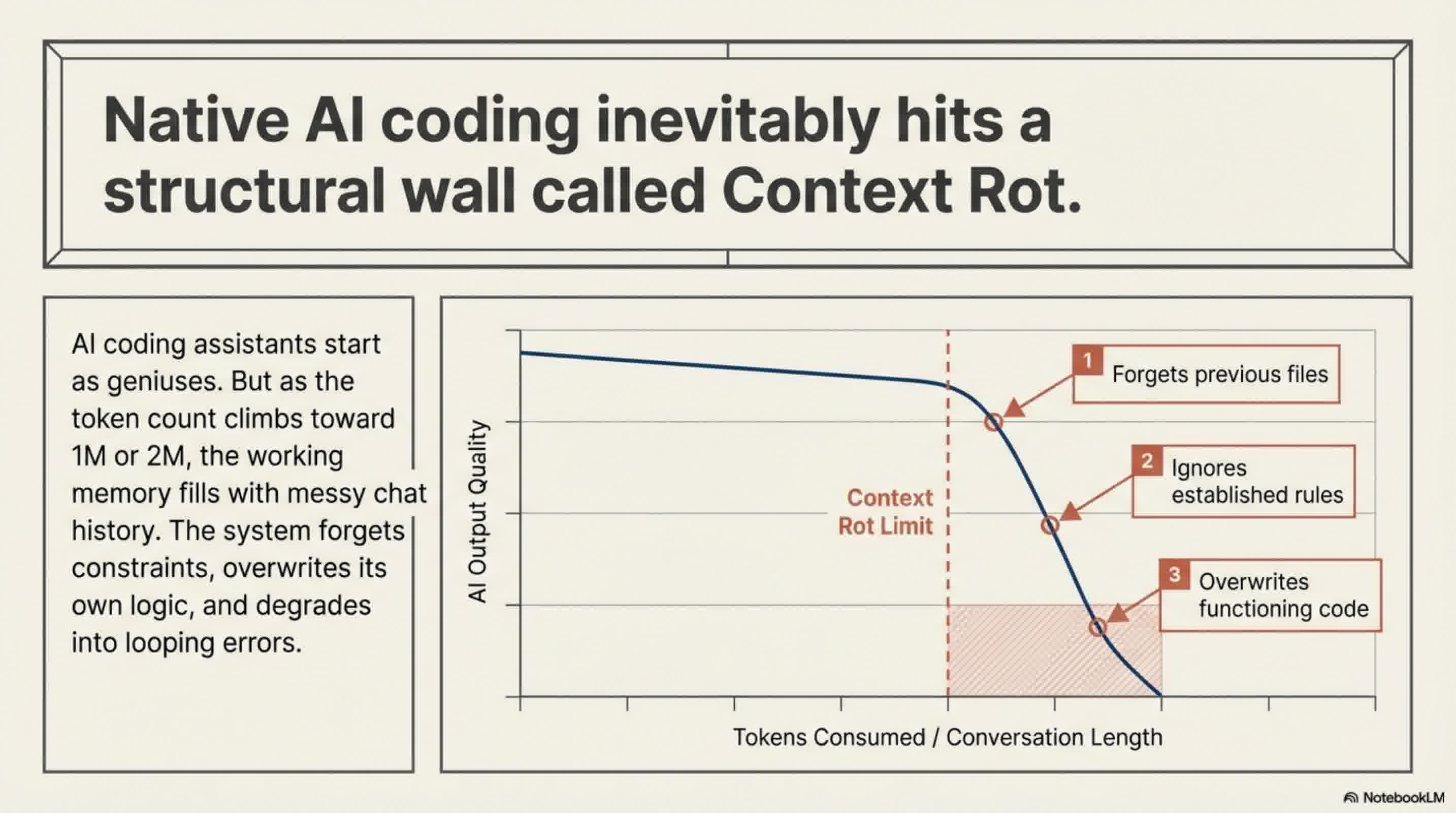
If you have been using AI coding assistants like Claude Code, you have likely experienced a frustrating phenomenon: in the beginning, the AI feels like an absolute genius. It maps out your file structure, writes pristine code, and sets up tests effortlessly. But about an hour into the session, it suddenly seems to suffer from amnesia. It forgets the files it just created, ignores the rules you established five minutes ago, and might even overwrite its own perfectly good code.
You start spending more time fixing the AI's bugs than writing actual code, leading to the common misconception that AI is only good for building quick prototypes.
The good news? This isn't your fault. It is a structural limitation of AI models known as Context Rot. And recently, a powerful framework called GSD (Get Shit Done) has emerged to solve this exact problem.
Here's exactly why your AI coder degrades over time and how the GSD framework structurally eliminates the issue.
The Diagnosis: What is "Context Rot"?
Every AI model has a "context window," which essentially acts as its short-term memory or working notepad. Every time you chat, ask for a revision, or change your mind ("No, not like that, do it this way"), that entire conversation history is saved into the notepad.
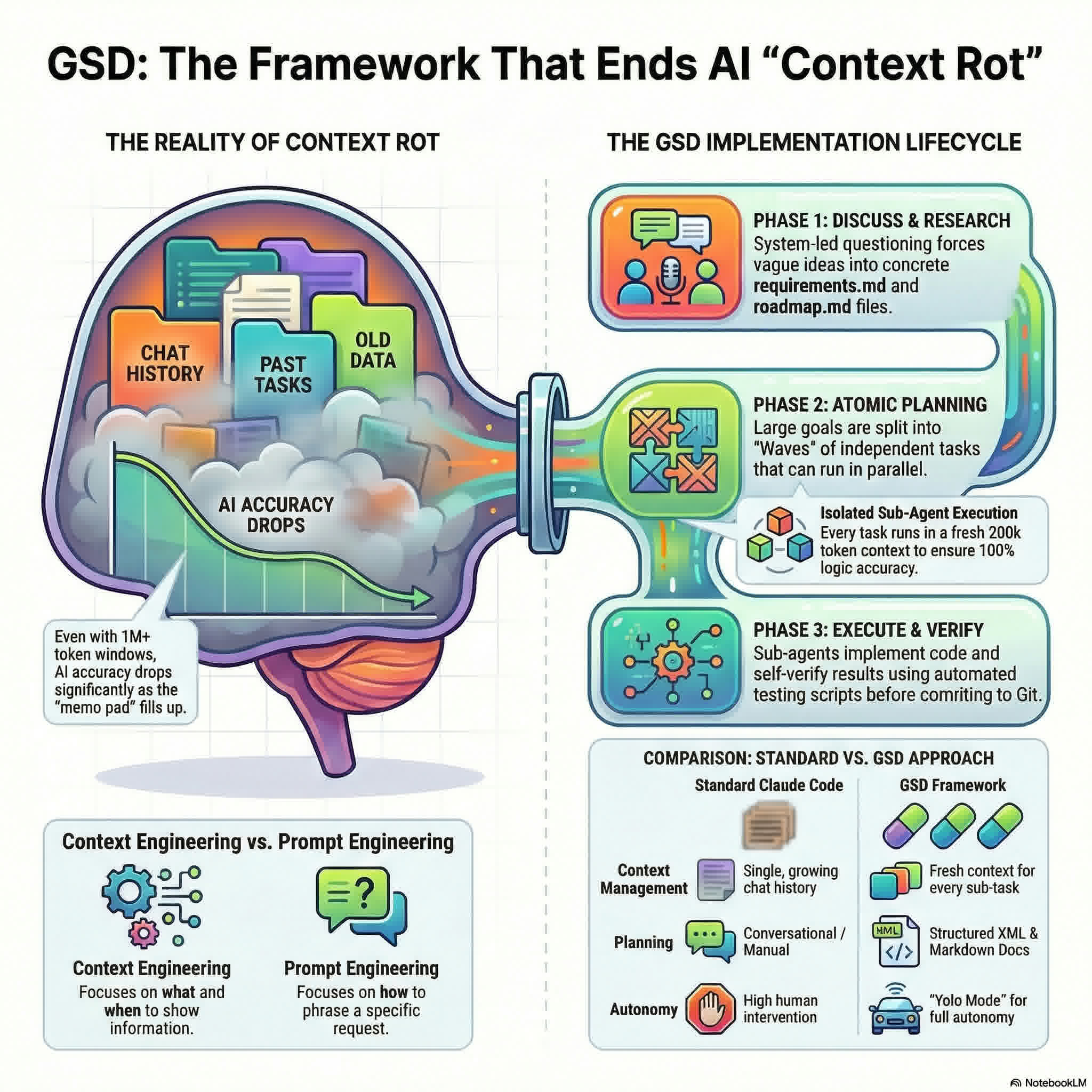
Even with massive context windows of 1 million or 2 million tokens, the notepad eventually fills up. More importantly, it fills up with noise. When an AI has to dig through a massive, messy chat history full of trial-and-error corrections, the quality of its output degrades. It starts losing track of the core instructions, leading to what developers call Context Rot.
As one developer put it, no matter how big the context window gets, if you put garbage in, you will get garbage out. The AI's working memory becomes a bloated mess, and your brilliant coding assistant turns "stupid."
The Antidote: The GSD Framework
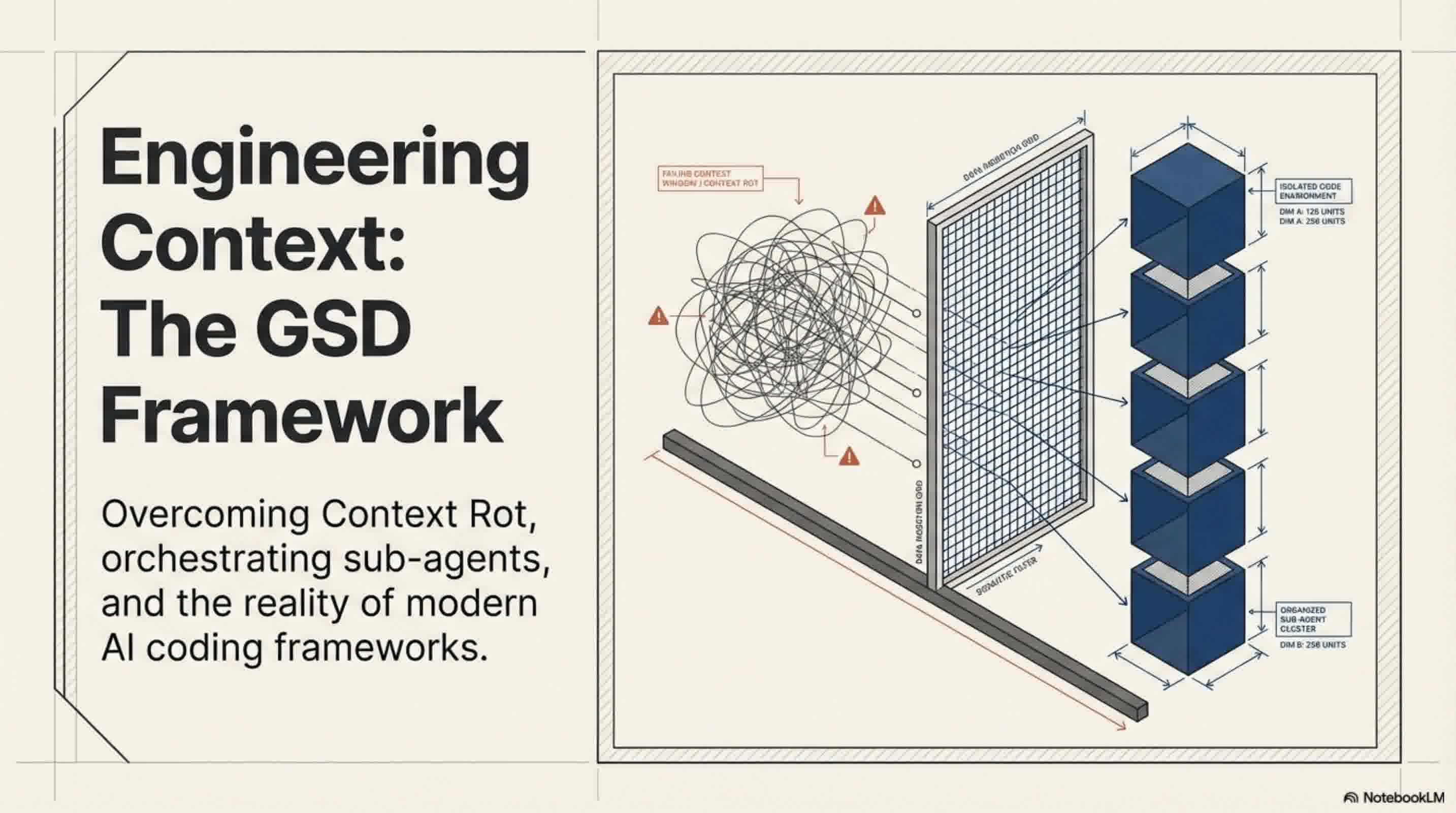
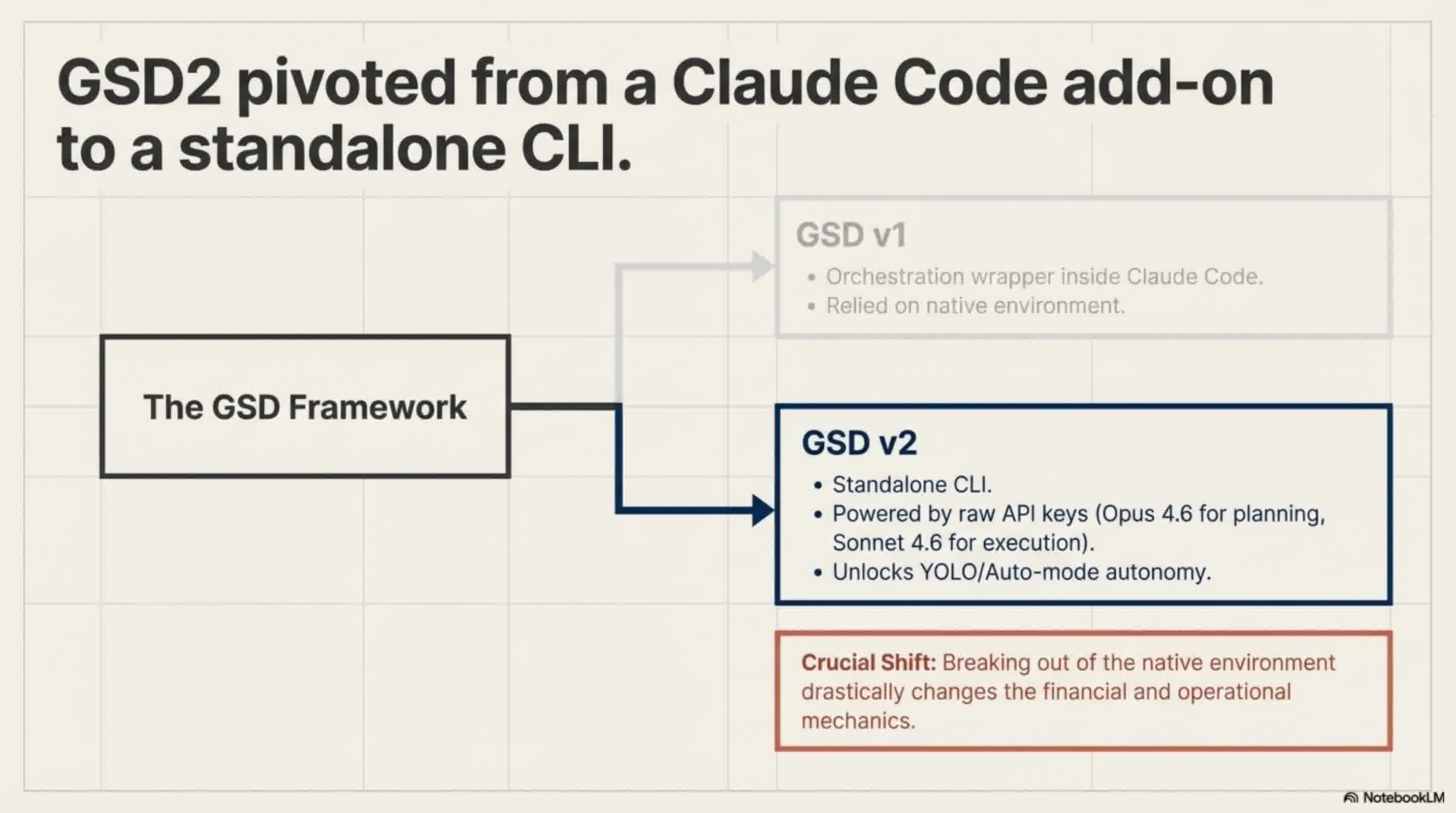
To combat this, a meta-prompting orchestration system called GSD (Get Shit Done) was created. While it originally started as an add-on living inside Claude Code, it has recently evolved into a standalone agentic CLI tool (GSD2). It is actively being used by engineers at massive tech companies like Amazon, Google, and Shopify.
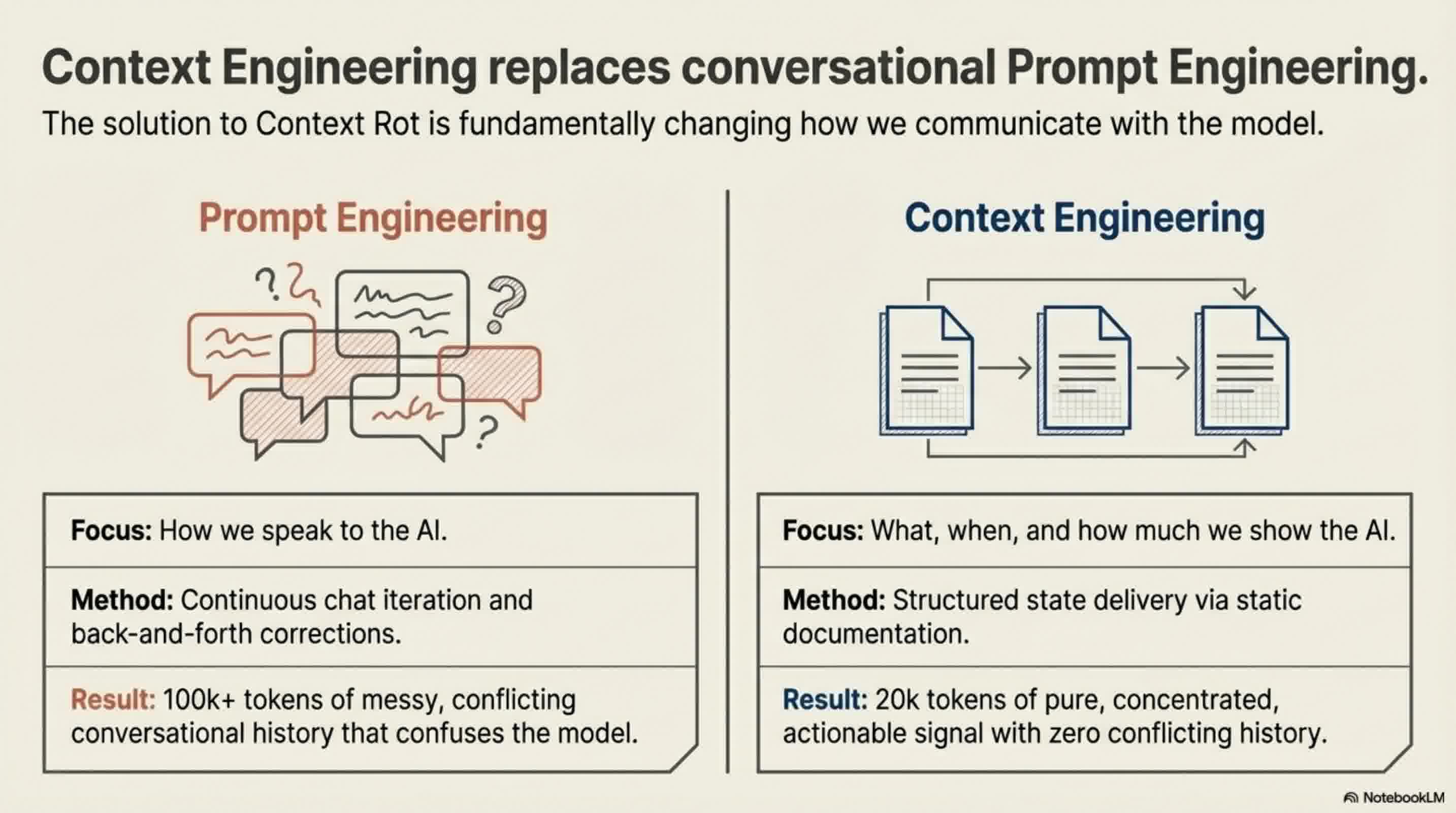
GSD doesn't replace the AI; it is a system that forces the AI to code better by managing its context. It shifts the paradigm from Prompt Engineering (how you talk to the AI) to Context Engineering (what, when, and how you show information to the AI).
Here's how GSD structurally prevents Context Rot:
1. Sub-Agents with Fresh Context Windows
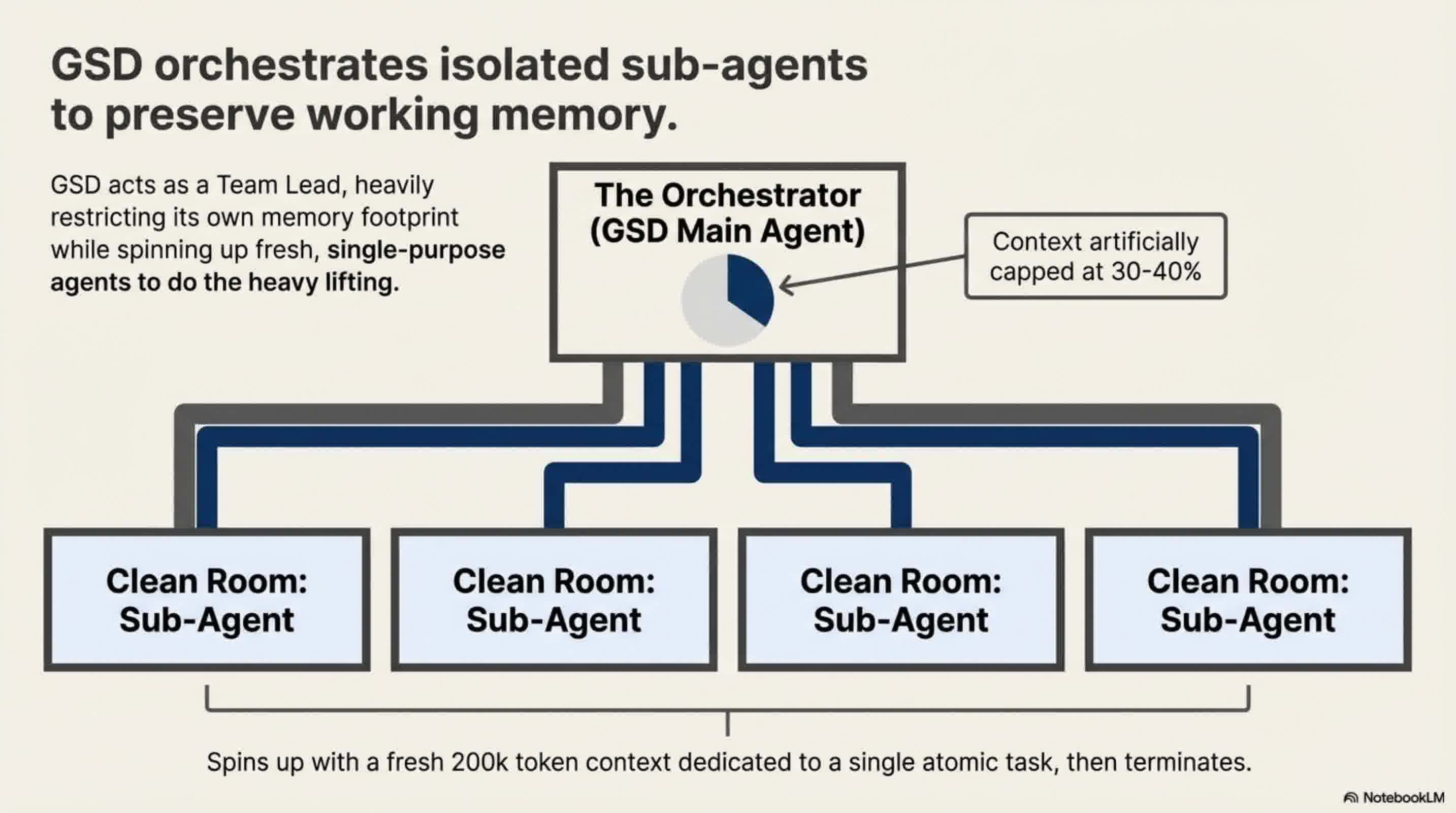
The traditional way of using AI is forcing it to do all the planning, researching, coding, and verifying inside one single context window. GSD changes this by acting as an orchestrator. When it's time to write code, GSD spins up multiple "sub-agents".
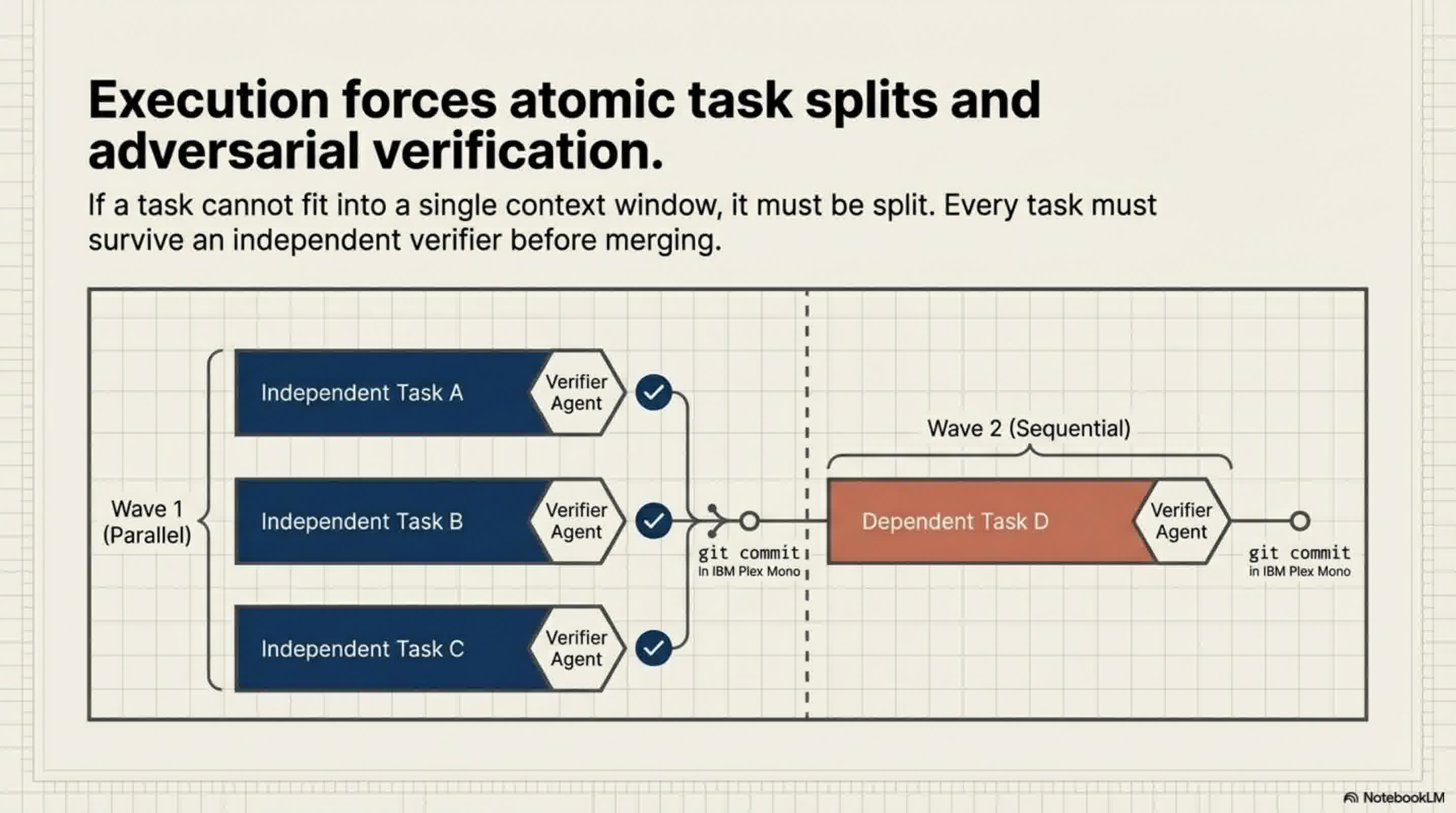
Each sub-agent is handed a very specific task and, crucially, given a completely fresh, clean context window (often around 200,000 tokens) dedicated solely to that one task. GSD operates on an "Iron Rule": a task must fit into one context window; if it doesn't, it must be split into two tasks. Because these sub-agents start with a blank slate, Context Rot never has the chance to set in.
2. Documents over Chat History
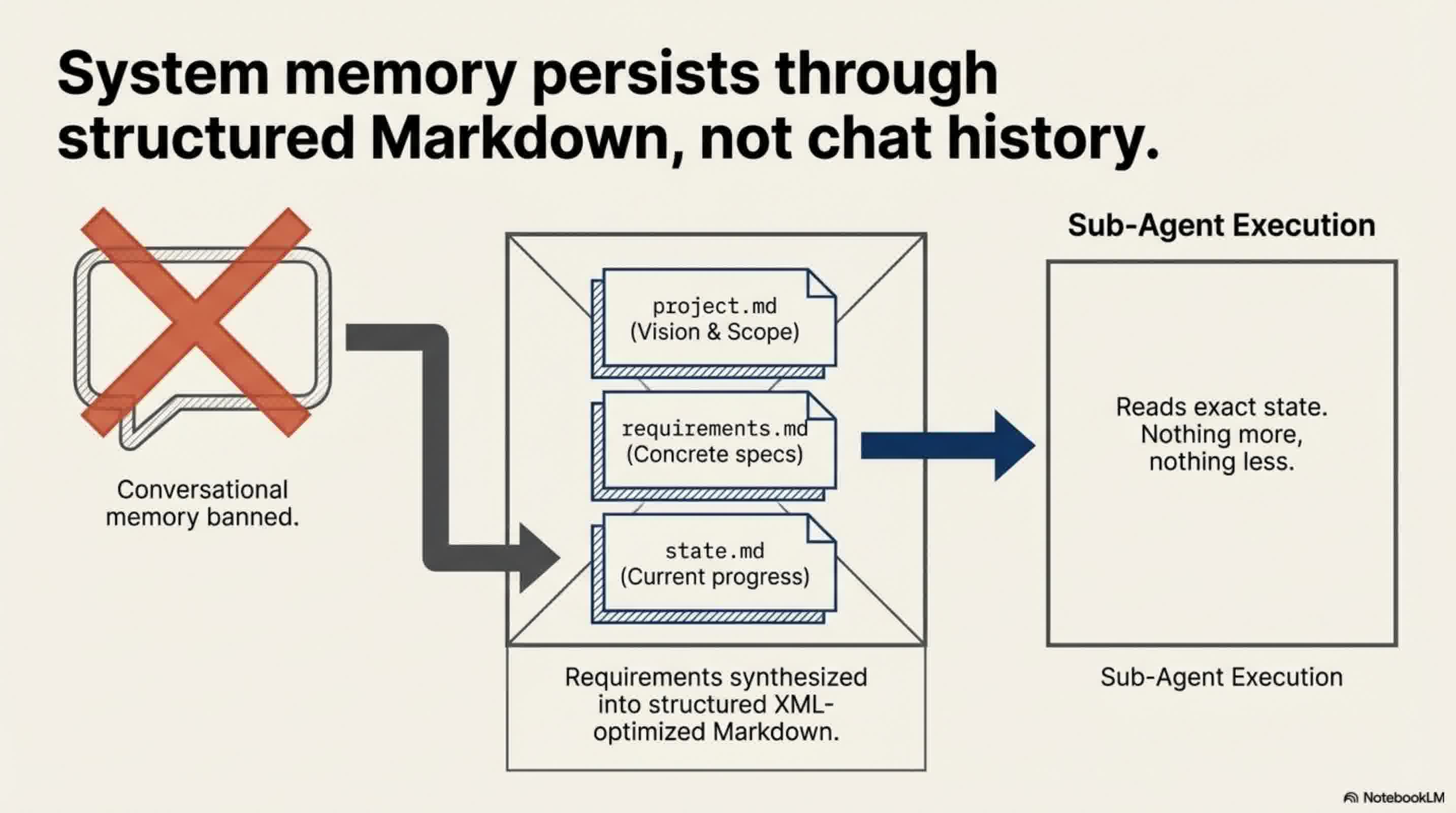
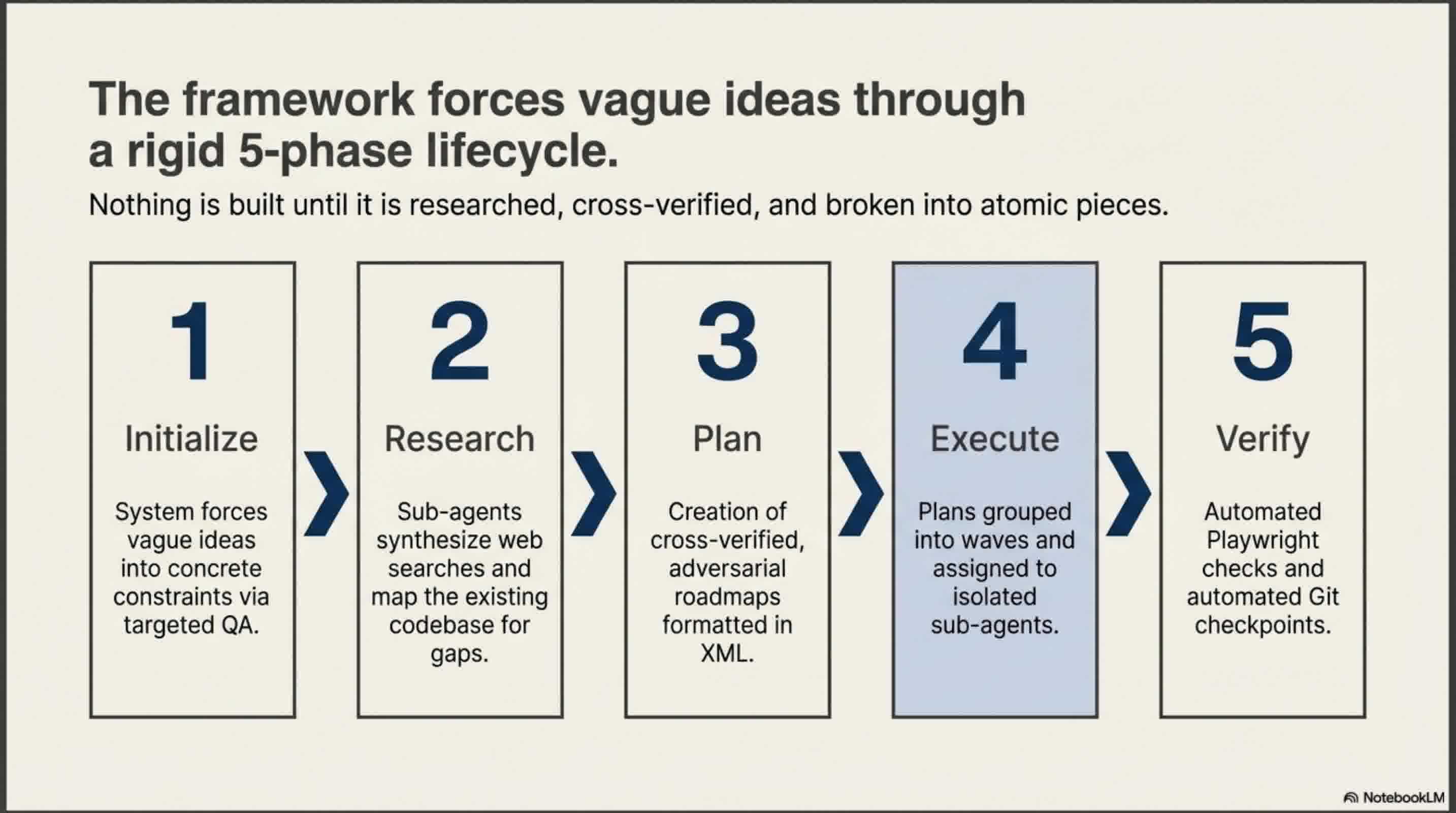
Instead of relying on a messy chat history, GSD forces you to clarify your ideas upfront. It asks you targeted questions to eliminate ambiguous requirements, and then automatically generates highly structured Markdown files (like project.md and requirements.md).
When a sub-agent is spun up to do a job, it isn't given your entire chat history. It is only given the specific, concise documents it needs to complete its task. A clean, structured 20,000-token document yields vastly better results than a messy 100,000-token chat log.
3. The Orchestrator Pattern
In this system, the main AI acts like a project manager. It doesn't write the code; it just reads the plan, delegates tasks to the sub-agents, and directs traffic. Because the "manager" is only orchestrating, its own context window only ever gets 30% to 40% full, keeping its "mind" perfectly clear. Tasks that are independent are executed simultaneously in parallel waves, while dependent tasks are executed sequentially.
4. Automated Verification loops
GSD doesn't just write code and hope for the best. Every task has built-in verification. Sub-agents will automatically check if the code exists, run tests, and spin up a dedicated "debugger agent" if something fails. It even utilizes internal scripts to check code quality before ever performing a Git commit.
How to Apply This Without Using GSD
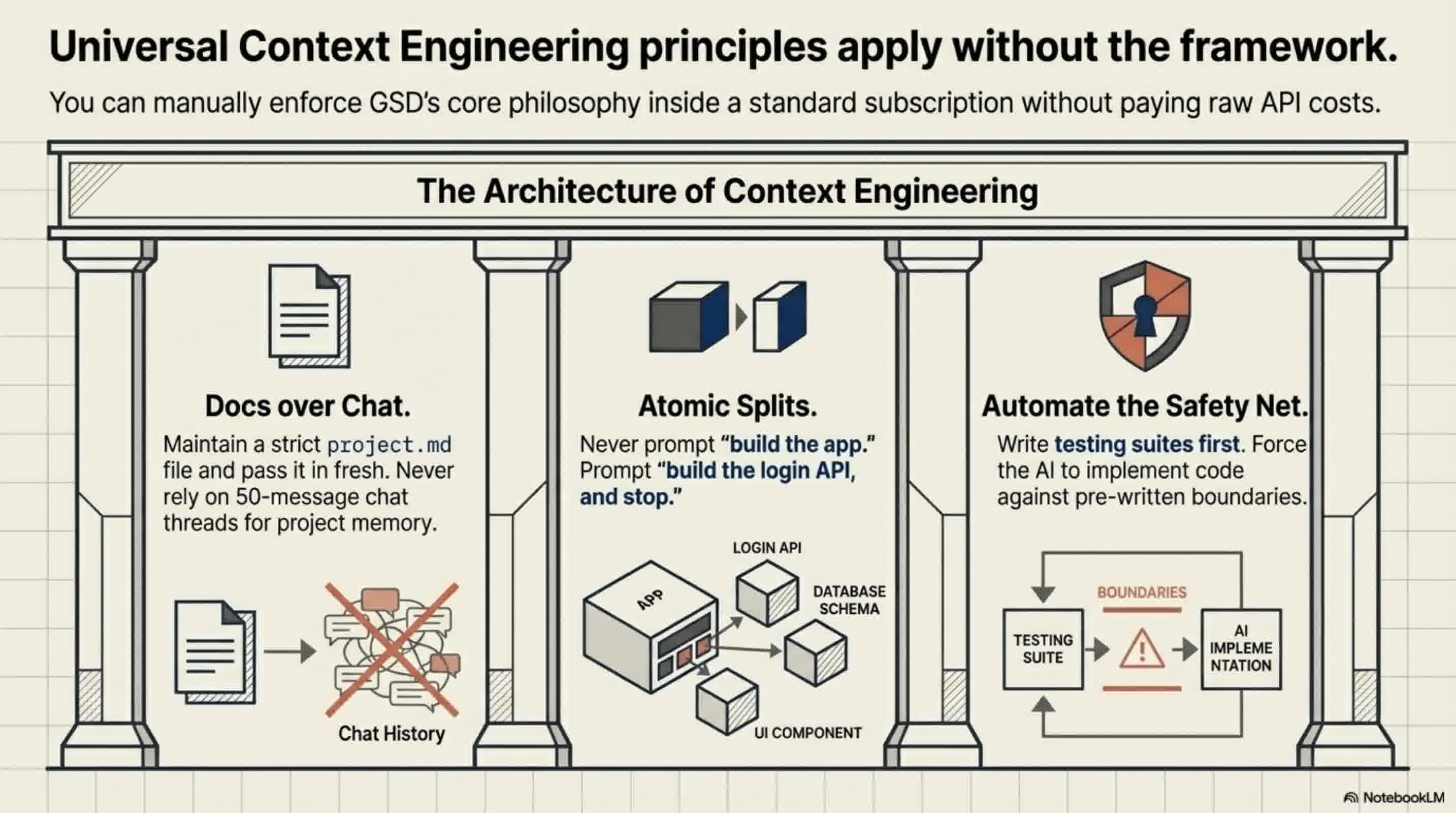
Even if you decide not to install the GSD framework, you can drastically improve your AI coding sessions by manually adopting its core principles:
- Stop Chatting, Start Documenting: Stop giving your AI dozens of rapid-fire chat corrections. Instead, maintain a central Markdown file for your project structure and rules. Update the document, clear your AI's context window, and feed the clean document back to it.
- Atomize Your Tasks: Never ask an AI to "build an app." Ask it to build a single login API endpoint. Keep tasks atomic so the context window remains small and manageable.
- Automate Your Testing: Write your test codes first and let the AI implement the logic until the tests pass. Having an automated safety net allows you to trust the AI's output without bloating the context with manual debugging.
As AI models continue to grow more powerful, the developers who succeed won't just be the ones writing the best prompts—they will be the ones who master Context Engineering.
📄 Briefing Doc: Technical Analysis
📋 Technical Specifications & Detailed Analysis
Executive Summary
The GSD (Get Shit Done) framework is an open-source, spec-driven development framework designed to orchestrate AI coding agents. Originally built as a meta-prompting orchestration layer on top of Claude Code, it has recently evolved into GSD2—a standalone, agentic CLI tool built on the PI SDK. The framework's primary objective is to eliminate "Context Rot," a structural limitation where an AI model's output quality degrades as its context window fills up with noisy chat histories and trial-and-error corrections. GSD solves this by shifting the paradigm from Prompt Engineering to Context Engineering: ensuring the AI receives the right information, at the right time, in the right format.
The Core Problem: Overcoming Context Rot
Even with massive context windows (like Claude's 1 million to 2 million tokens), traditional AI coding sessions inevitably break down over time. When users force an AI to plan, research, develop, and verify inside a single, continuous context window, the AI becomes overwhelmed by the token consumption and messy chat logs. It begins forgetting previous rules, repeating mistakes, and overwriting its own files. As the saying goes, no matter how large the context window is, "if you put garbage in, you will get garbage out". GSD structurally prevents this by atomizing tasks and completely isolating context windows.
Core Mechanics & Architecture
GSD does not replace the AI model; it acts as a project manager that forces the AI to code more effectively through strict orchestration.
- Document-Driven Context: Instead of relying on a running chat history, GSD forces users to clarify ambiguous ideas upfront through targeted questioning. It then distills these requirements into concise, highly structured Markdown files (e.g.,
project.md,requirements.md,roadmap.md). Crucially, GSD formats its internal instructions using XML, as Claude models parse XML structures much more efficiently. - Adversarial Planning & Research: Before writing code, GSD spins up specialized sub-agents to research technical gaps (e.g., security, UX) and synthesize findings. It utilizes an "adversarial planning" system where a "Planner Agent" creates execution steps, and a separate "Verifier Agent" actively cross-checks the plan for viability, sending warnings back until the plan is foolproof.
- The Orchestrator & Wave Execution: Tasks are grouped into "waves." Independent tasks are executed simultaneously in parallel, while dependent tasks run sequentially.
- Fresh Context Windows: This is GSD's "Iron Rule": every single task is executed by a newly spawned sub-agent with a completely clean, fresh context window (typically around 200,000 tokens). By isolating tasks, the main orchestrator's context window remains only 30% to 40% full, completely neutralizing Context Rot.
- Automated Verification: Every task includes built-in verification. Sub-agents run under-the-hood checks (like Playwright testing) to ensure code exists and passes tests before executing a Git commit. If it fails, a dedicated debugger agent is spun up to find the root cause.
The Evolution: GSD vs. GSD2
The recent release of GSD2 marks a massive shift in how the tool operates.
- Standalone CLI: GSD2 no longer lives inside Claude Code; it is its own CLI competitor built on the PI SDK.
- Dual-Terminal Workflow: GSD2 utilizes a two-terminal system. One terminal runs on "Auto" as the workhorse executing the code autonomously, while the second acts as a "Discussion" terminal where the user can chat, change their mind, and feed new instructions to the working agent via disk updates.
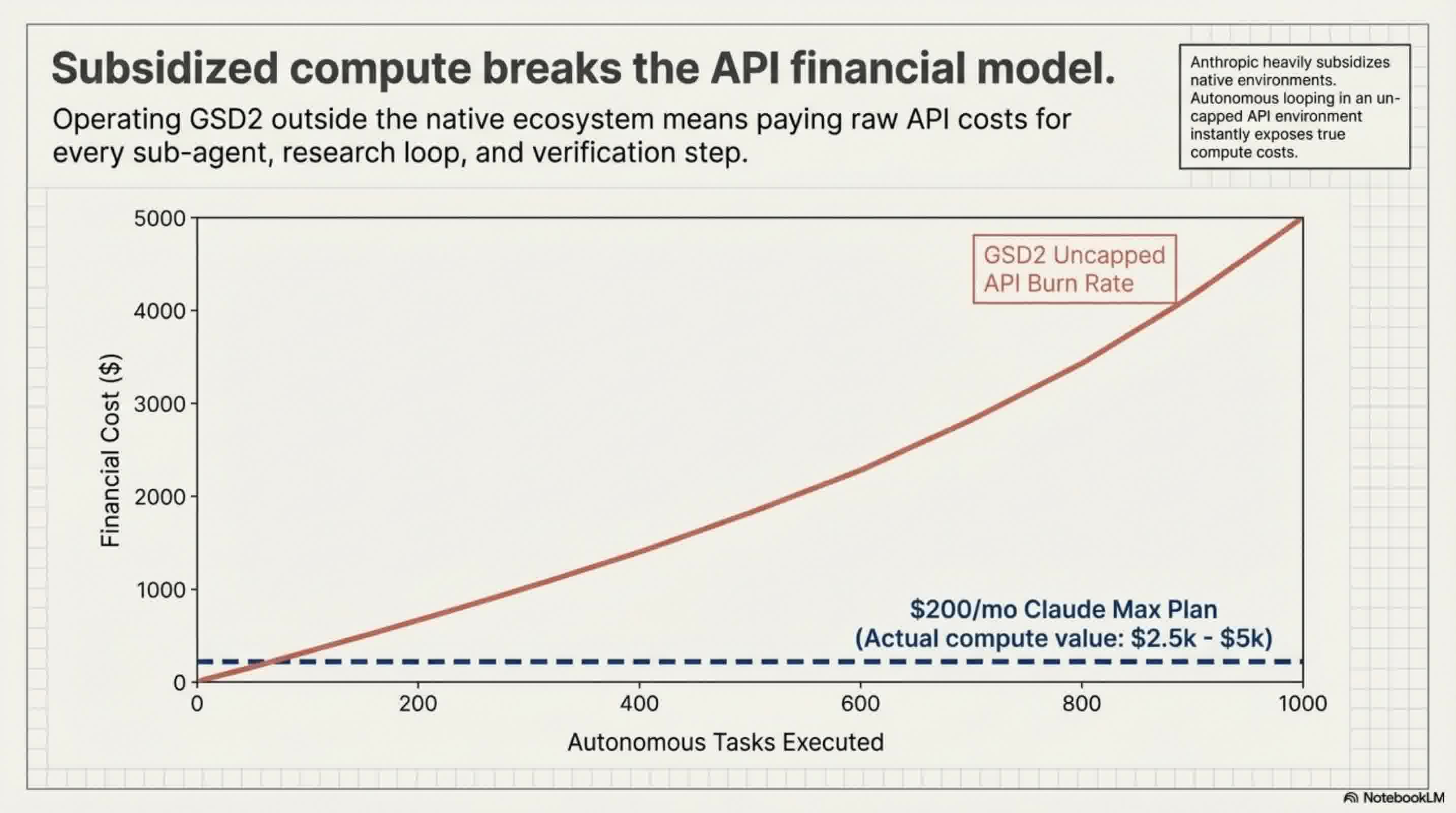
- API Reliance: Because GSD2 operates outside the Claude ecosystem, it requires paid API keys. Users are strongly warned against using subsidized Claude "Max" plan OAUTH credentials for GSD2, as Anthropic may ban accounts for using subsidized tokens outside their official ecosystem.
Cost, Performance, and Limitations
While GSD is incredibly powerful for context management, it comes with significant overhead.
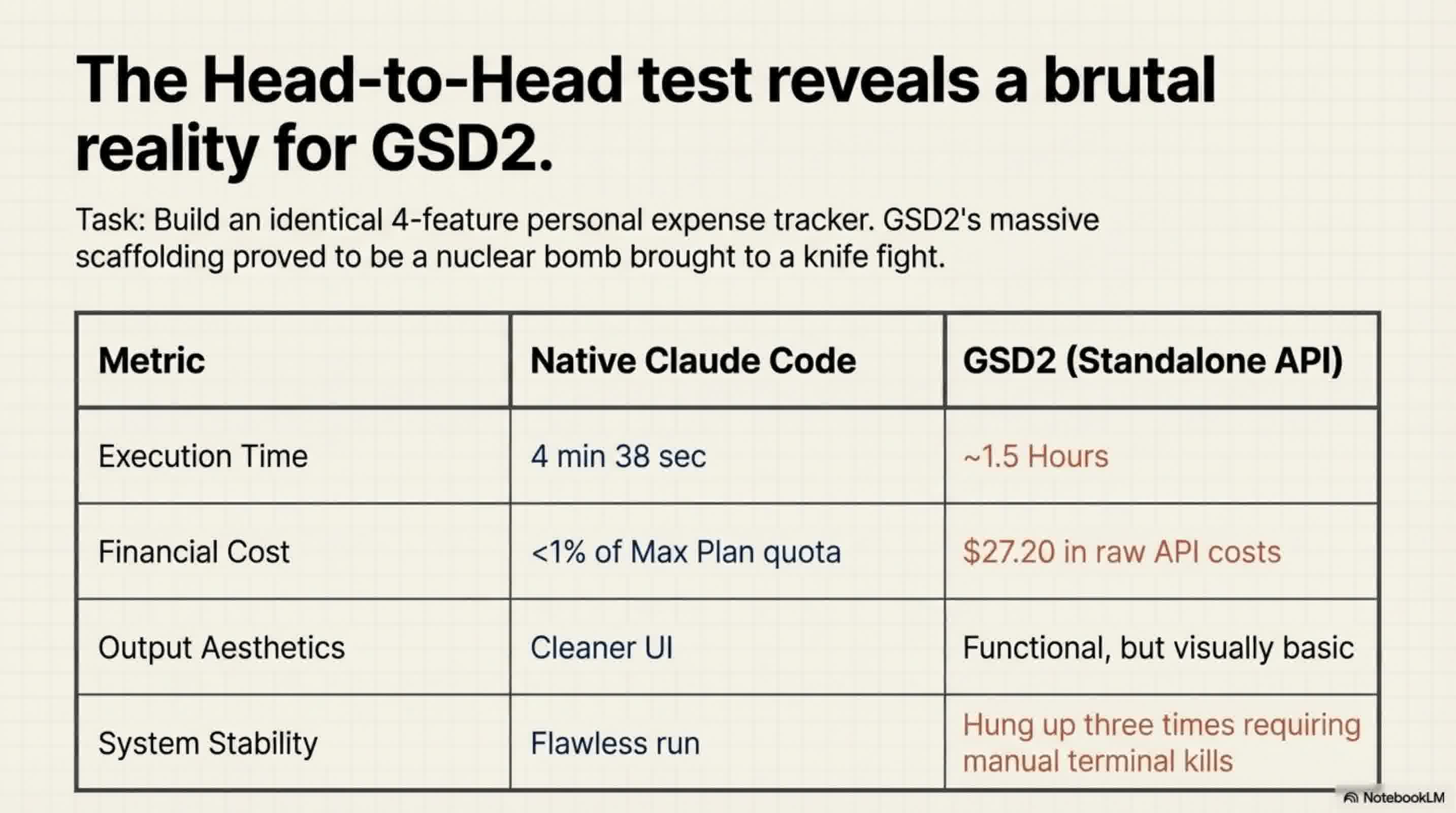
- High Financial Cost: Because GSD2 relies heavily on spinning up multiple agents via API (often using high-tier models like Opus 4.6 for planning and Sonnet 4.6 for execution), it is expensive. In a head-to-head test building a basic expense tracker, GSD2 cost nearly $30 in API fees, whereas the standard Claude Code used less than 1% of a standard usage block. Users can implement a "budget ceiling" to prevent runaway costs, but the baseline expense is high.
- Slow Execution Time: GSD's extensive planning, sub-agent spawning, and verification takes time. The same expense tracker took Claude Code roughly 4.5 minutes, while GSD2 took nearly 1.5 hours (partially due to the system getting hung up and requiring restarts).
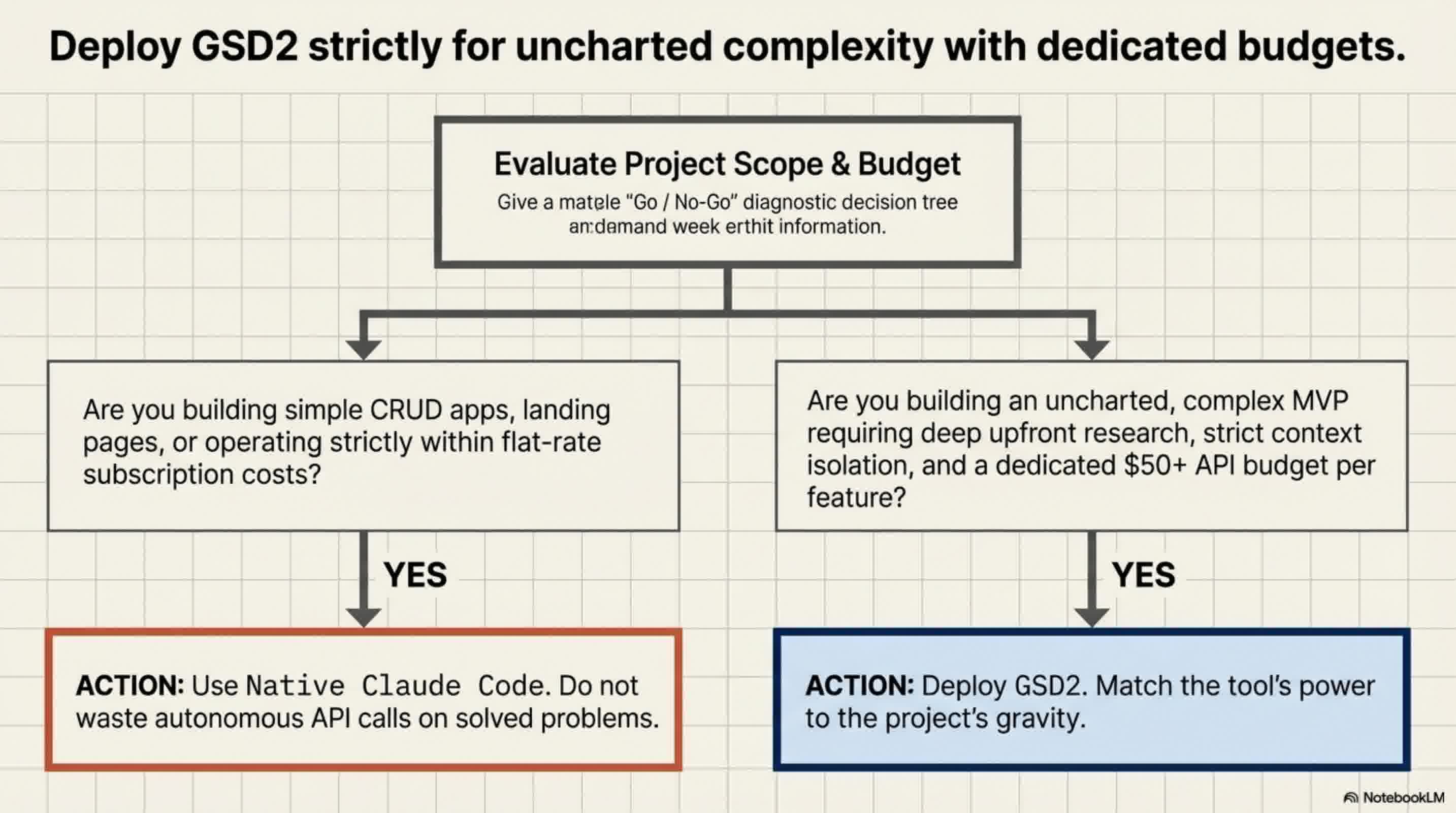
- Over-Engineering: For simple applications, GSD is heavily overkill—described as bringing a "nuclear bomb to a knife fight".
Strategic Implementation: When to Use GSD
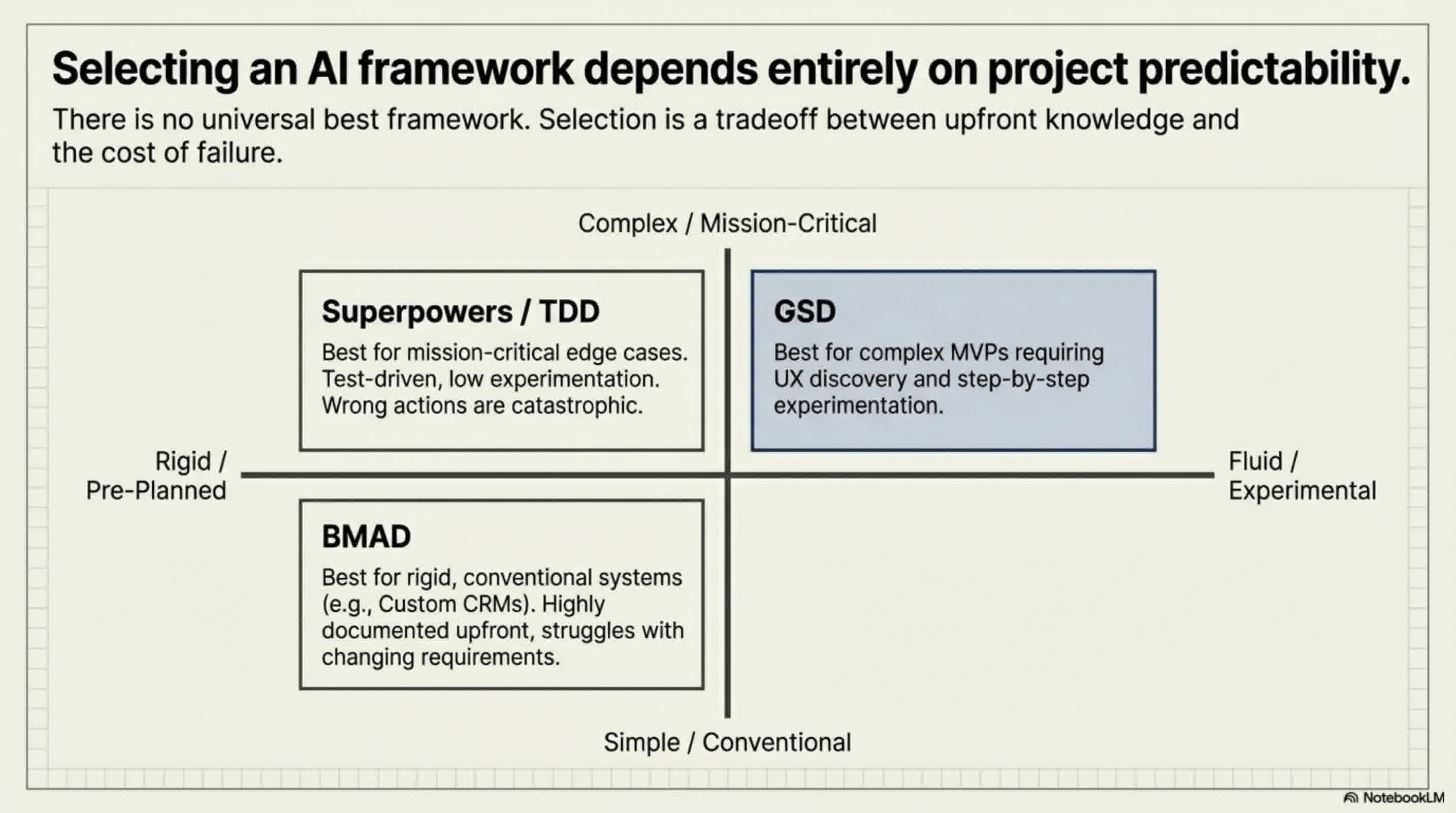
GSD is not a one-size-fits-all tool. Framework selection should be based on the project scope:
- Best Use Case: GSD is ideal for large-scale applications or experimental MVP projects where you aren't entirely sure what the final product will look like and need flexibility. Because it plans step-by-step rather than locking in all phases upfront, it accommodates shifting requirements beautifully.
- When to Avoid: If you are building a simple app or a standard script, standalone Claude Code is significantly faster and cheaper. If you know exactly what you are building with zero need for flexibility, the BMAD method is better for strict upfront architecture. If you are building a high-stakes app where an edge-case failure is catastrophic (like an AI agent taking real-world actions), a strict Test-Driven Development (TDD) framework like Superpowers is recommended.
