


Purpose: Define a clear product vision and align the team’s UX strategy with business goals through tangible design milestones and roadmap planning.
Design Thinking Phase: Define
Time: 60–90 min workshop + 2–4 hours documentation
Difficulty: ⭐⭐
When to use:When a product is entering a new strategic phase or launch windowWhen stakeholder alignment around UX strategy is fragmentedWhen design teams need clarity on quarterly or annual focus areas
What it is
A Vision & Roadmap session is a strategic design activity that aligns the team around a shared product vision and breaks it down into a prioritised UX roadmap. It defines what success looks like for users and how design can progressively deliver on that experience across time.
UX Roadmaps 101
UX Roadmaps in 6 Steps
📺 Video by NNgroup. Embedded for educational reference.
Why it matters
A shared UX roadmap keeps everyone aligned—from C-suite to sprint teams. Without it, design efforts drift or become reactive. Vision & Roadmap sessions help product and design work toward meaningful outcomes with clarity, structure, and focus. They bridge strategic thinking and tangible product goals.
When to use
- At the start of a new product cycle or pivot
- During annual planning or quarterly roadmap definition
- After usability or research reveals a major user pain point needing strategic redesign
Benefits
- Rich Insights: Helps uncover user needs that aren’t visible in metrics.
- Flexibility: Works across various project types and timelines.
- User Empathy: Deepens understanding of behaviours and motivations.
How to use it
Run a Vision & Roadmap workshop with key designers, product managers, engineers, and stakeholders. Lead the team through the following activities:
- Review Current State: Discuss what’s working, what’s not, and what users are asking for. Pull insights from research and data.
- Define the UX Vision: Articulate a future state narrative. Describe what a delightful and impactful user experience looks like.
- Identify Success Criteria: What does success mean for users and the business? Define outcomes, signals, and metrics.
- Align Cross-Functionally: Integrate product and engineering milestones already in motion or planned.
- Map the Road Ahead: Break the UX vision into phases or feature groups over time (e.g., Q1–Q4, V1/V2, Alpha→MVP). Include design goals and dependencies.
- Visualise It: Document as a shareable roadmap using clear labels (e.g., “Reduce support calls by redesigning Help flow — Q2”). Prioritise human impact just as much as technical delivery.
Example Output
UX Vision: “Help new users feel confident and supported within their first 2 sessions.”
Strategic Design Goals Q2–Q4:
- Q2: Redesign onboarding flow to clarify setup steps and eliminate friction
- Q3: Launch contextual in-app guidance based on behavioural triggers (e.g., empty states)
- Q4: Introduce a help centre carousel above footer on key task pages for just-in-time support
Common Pitfalls
- Too vague or visionary: Over-indexing on “dream state” UX concepts without a plan for feasibility and iteration
- No stakeholder input: Creating a design roadmap in a silo leads to misalignment and rework
- No ownership: Not assigning roles or next steps post-session results in the roadmap collecting dust
10 Design-Ready AI Prompts for Vision & Roadmap – UX/UI Edition
How These Prompts Work (C.S.I.R. Framework)
Each of the templates below follows the C.S.I.R. method — a proven structure for writing clear, effective prompts that get better results from ChatGPT, Claude, Copilot, or any other LLM.
C.S.I.R. stands for:
- Context: Who you are and the UX situation you're working in
- Specific Info: Key design inputs, tasks, or constraints the AI should consider
- Intent: What you want the AI to help you achieve
- Response Format: The structure or format you want the AI to return (e.g. checklist, table, journey map)
Level up your career with smarter AI prompts.Get templates used by UX leaders — no guesswork, just results.Design faster, research smarter, and ship with confidence.First one’s free. Unlock all 10 by becoming a member.
Prompt Template 1: “Define a cross-functional UX Vision Statement:”
Define a cross-functional UX Vision Statement:

Context: You are a Senior Product Designer leading innovation on a [complex SaaS workflow tool].
Specific Info: Recent research highlights [onboarding friction] and [first-time user confusion]. The team has goals involving [user retention] and [support ticket reduction].
Intent: Craft an inspiring yet actionable UX vision statement that aligns with cross-functional goals and guides roadmap planning.
Response Format: Output a single paragraph UX vision, followed by 3 core design principles and examples per principle.

If the value prop or key personas are unclear, ask clarifying questions.
Offer a follow-up idea to align this vision with engineering or product planning.
Prompt Template 2: “Generate a UX Roadmap from Strategic Goals:”
Generate a UX Roadmap from Strategic Goals:

Context: You’re part of a Product-Design duo shaping the roadmap for a [mobile health app] aiming to improve [daily user adherence].
Specific Info: The business objective is to reduce user churn by 20% in two quarters. Known pain points include [feature overload] and [shallow habit tracking].
Intent: Break down strategic design opportunities into a quarterly UX roadmap with clear priorities.
Response Format: Table with column headings: Goal, Design Focus, Deliverables, Timeline

Ask for more info if the business OKRs or team capacity is unclear.
Suggest a design-led milestone that could be tied to experimental metrics.
Prompt Template 3: “Facilitate a Vision Alignment Workshop:”
Facilitate a Vision Alignment Workshop:

Context: You’re hosting a remote session with stakeholders from Product, Design, and Support for a [streaming platform redesign].
Specific Info: UX research shows emerging preferences around [personalisation] and [recommendation transparency].
Intent: Generate a 60–90 min workshop agenda that prompts stakeholders to co-create a shared UX vision.
Response Format: Agenda outline with time blocks, suggested activities, and discussion prompts.

Offer one follow-up resource on how to turn outcomes into product epics.
Prompt Template 4: “Map UX Roadmap to OKRs:”
Map UX Roadmap to OKRs:

Context: You’re a Lead UXer preparing a quarterly report tying design work to company OKRs.
Specific Info: OKRs include “Improve user engagement by 25%” and “Decrease support tickets by 15%.”
Intent: Align planned and in-progress design initiatives to these OKRs with evidence-backed justifications.
Response Format: Table with: Objective, UX Initiative, Metric or Signal, Status

If needed, ask for clarification on metric definitions or initiative scope.
Suggest a UX metric not currently tracked but worth including.
Prompt Template 5: “Identify Roadmap Gaps from User Journeys:”
Identify Roadmap Gaps from User Journeys:

Context: You’re assessing existing design work against full lifecycle journeys for a [civic services portal].
Specific Info: Analysis shows weak coverage in the “mid-journey” problem-solving phase for [older, less tech-savvy users].
Intent: Identify blind spots where design is missing and suggest roadmap additions.
Response Format: List of gaps, why they matter, and proposed roadmap items.

Ask if journey stages or personas need further detail.
Propose a follow-up workshop activity to ideate on one issue.
Prompt Template 6: “Turn UX Strategy into Research Backlog:”
Turn UX Strategy into Research Backlog:

Context: You’re structuring your team’s next research cycle for a [subscription-based productivity tool].
Specific Info: The UX vision prioritises reducing friction in task setup and boosting daily active use.
Intent: Translate vision priorities into 3–5 specific research questions to feed into your next cycle.
Response Format: Table with: Research Question, Method, Relevance to Vision Goal

Offer a suggestion for who else should review the backlog for alignment.
Prompt Template 7: “Create UX Vision Principles from a Product Strategy Brief:”
Create UX Vision Principles from a Product Strategy Brief:

Context: You’re reviewing the new business brief for an upcoming product targeting [remote freelancers].
Specific Info: Strategy calls for simplifying workflows while enabling power-user depth.
Intent: Derive 3 strong UX principles that align with the product values and can guide design decisions.
Response Format: Each principle with a short label and an example of how it might show up in UI or product choices.

Ask if there are conflicting values you should resolve in the process.
Propose a principle-to-pattern mapping exercise as a next step.
Prompt Template 8: “Summarise Stakeholder Goals for Roadmap Planning:”
Summarise Stakeholder Goals for Roadmap Planning:

Context: You’ve completed interviews with 5 stakeholders for a [B2B analytics dashboard refresh].
Specific Info: Conflicting priorities emerged between Sales (speed to onboard) and Product (depth of insights).
Intent: Synthesize goals into a structured view to support tradeoff discussions in roadmap planning.
Response Format: Table with stakeholder, key goals, tensions, and alignment suggestions.

Recommend a follow-up stakeholder huddle using this summary.
Prompt Template 9: “Translate Vision into Weekly UX Team Goals:”
Translate Vision into Weekly UX Team Goals:

Context: You’re leading a team of 3 designers mid-way through a V2 release of a [multi-role learning platform].
Specific Info: The UX vision emphasises role-clarity and delight in the handoff between modules.
Intent: Break down the vision into committed weekly goals with momentum baked in.
Response Format: Weekly goal list with task focus, purpose, and collaboration needs.

Ask whether constraints (tech, resourcing) need to be noted first.
Prompt Template 10: “Reframe a Feature Idea as Vision-driven Outcome:”
Reframe a Feature Idea as Vision-driven Outcome:

Context: You’ve received a stakeholder ask to “add dark mode” to the [admin panel of a web app].
Specific Info: The roadmap is currently vision-led, focused on clarity for power users who spend 5+ hours/day in app.
Intent: Evaluate this suggestion not just as a feature but as an experience payoff.
Response Format: Summary of context, reframed outcome, potential strategic fit, recommended next step.

Promote follow-up with a user lens or testing hypothesis.
Recommended Tools
- Miro or FigJam – for collaborative UX roadmap visualisation
- Whimsical – for mapping vision touchpoints to interface elements
- Notion – to document UX strategies, goals, OKRs, and progress
- ChatGPT, Claude, or Gemini – to ideate, validate, and align vision-related outputs fast
Learn More
 Sarah Gibbons
 Sarah Gibbons
 Sarah Gibbons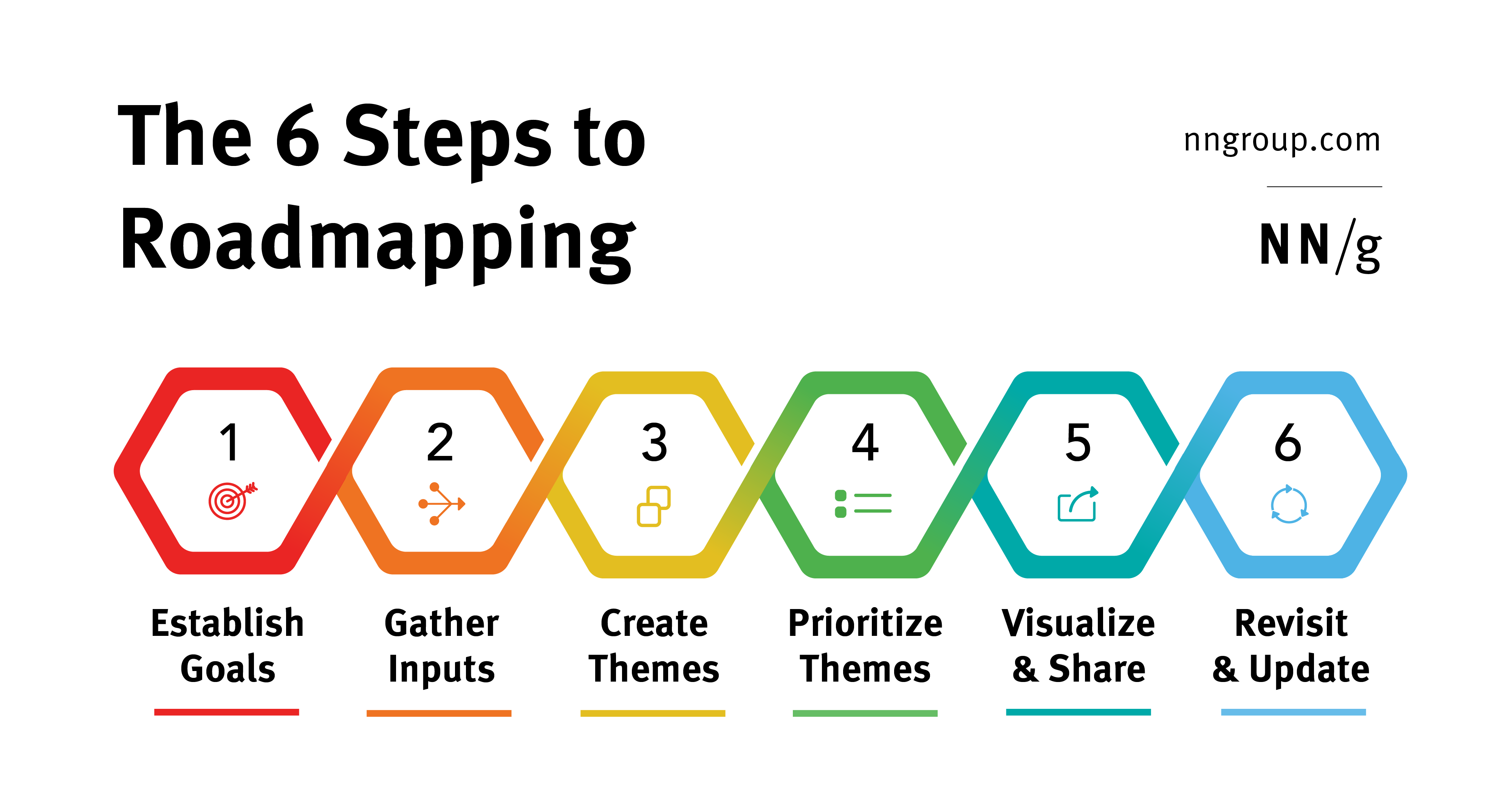
Creating a UX Roadmap
UX Roadmaps Common Questions
UX Roadmap Themes
