


ARTEMIS is Google's open-source Android automation agent. You write one instruction in plain English — "open Settings, find Battery, tell me the level" — and it reads the connected phone's screen. Then it taps, swipes and types until the task is done.
It also runs as a local service your coding agent can call. That turns "install this build and check the login screen" into a prompt in Claude Code or Codex, not a hand-written test script.
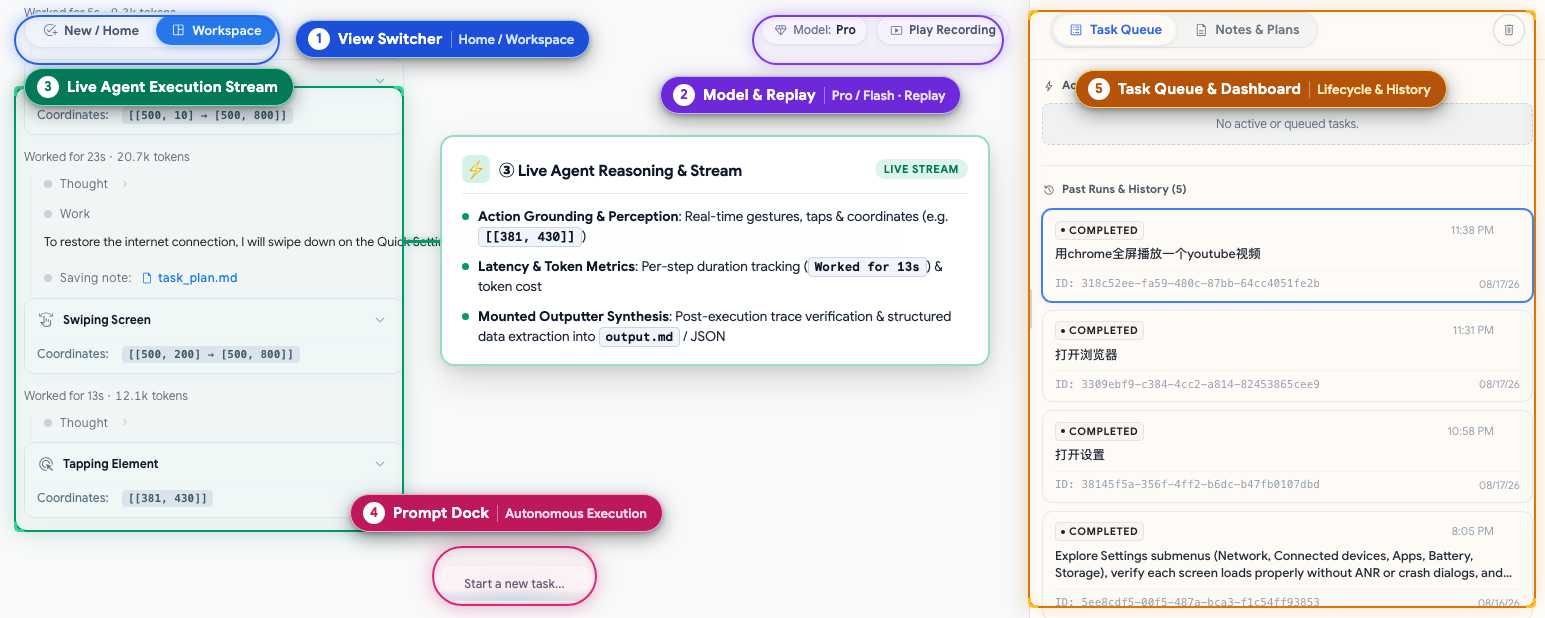
Google published it in August 2026 under Apache 2.0. The repository's own console screenshot, further down, shows what a run looks like step by step.
🚀 Quick Installation
You need an Android phone with USB debugging enabled (or an emulator) and a Gemini API key. Gemini is the default model provider. The start script installs ADB, scrcpy, FFmpeg and uv for you.
One-click start (macOS / Linux)
git clone https://github.com/google/artemis.git
cd artemis
cp .env.example .env      # add GEMINI_API_KEY
./start.sh                # console: localhost:8000
Run one task from the terminal
uv run artemis run \
  "Open Settings, find Battery, tell me level"
Hand the server to your coding agent
uv run artemis mcp --install allThat writes the server and its agent rules into Antigravity, Claude Code, Codex, Cursor and Windsurf.
Windows uses .\start.bat. Expect 15–20 minutes to a first successful task, most of it toolchain install and phone setup.
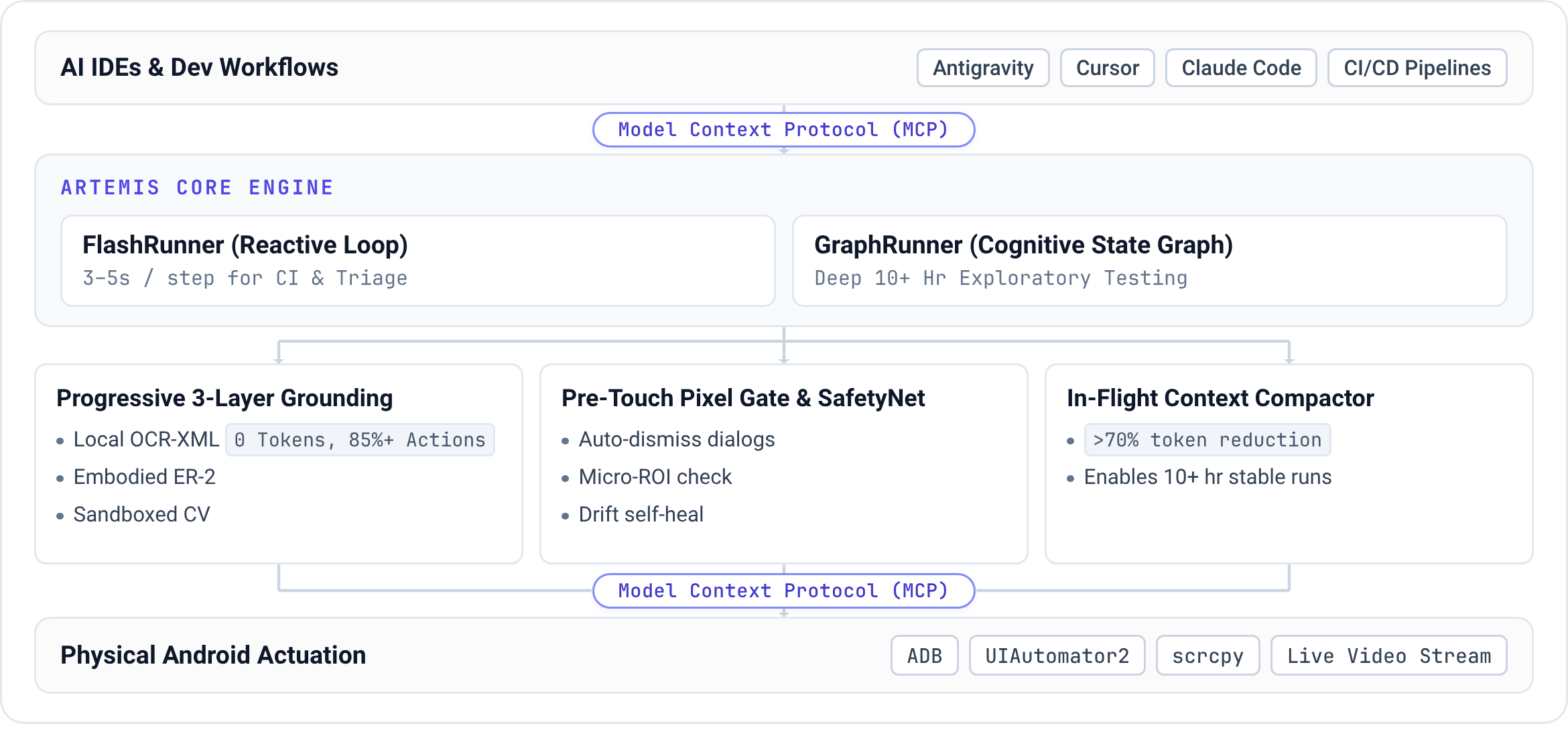
Money works differently from time. Most taps cost nothing: the architecture diagram reports 85%+ of actions resolved on the device from the screen's own text and layout, at zero tokens. The rest are model calls on your key, and the console screenshot shows two consecutive steps at 12k and 21k tokens.
What It Is
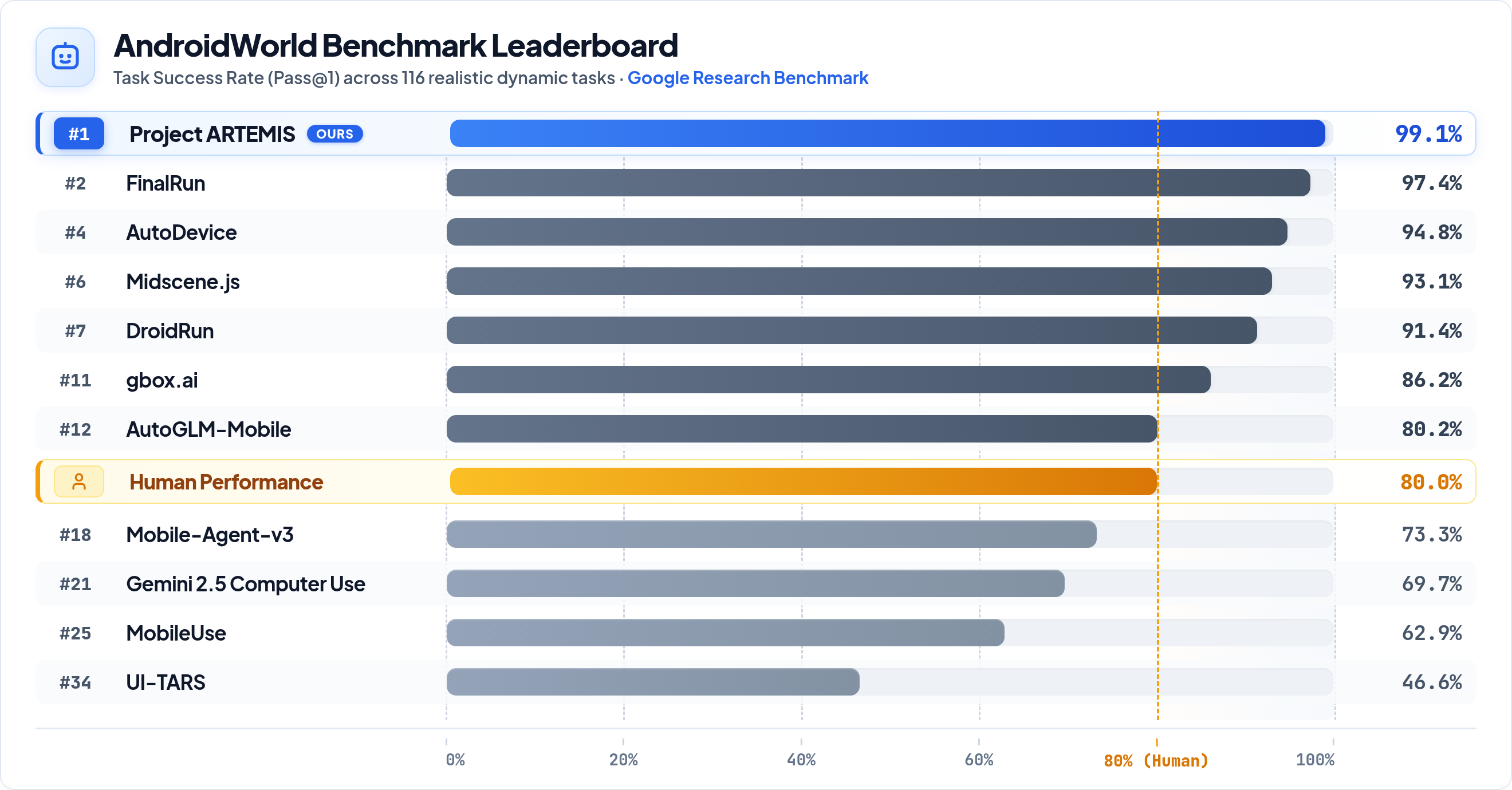
ARTEMIS turns natural-language instructions into reliable Android automation. It automates end-to-end workflows, captures logs, and integrates seamlessly with AI coding assistants such as Antigravity, Codex, and Claude Code. It also achieves 99%+ success rate on AndroidWorld Benchmark.
— the repository's README
AndroidWorld is Google Research's set of 100+ multi-step tasks across 20+ apps, and the authors report 99%+ completion. A tool that finishes tasks it has never seen is a different proposition from one that replays a recorded script.
What a Task Looks Like
Google's demo is one instruction. Set up a driving route in Google Maps, report the journey time, then open YouTube and play a Coldplay song. Two apps, no coordinates and no selectors.
Each step is the same loop: look at the screen, decide, act. The local console shows every tap with its position and duration, then replays the run as video. That replay makes the output reviewable, because you can see where a run went wrong instead of reading a pass or fail line.
Two Speeds, Two Trades
ARTEMIS has two modes, and picking between them is the decision you actually make.
| Flash | Pro | |
|---|---|---|
| Time per step | 3–5 seconds | 15–40 seconds |
| How it plans | One model, reacting to the live screen | A written task plan with checkpoints |
| Before each tap | Acts directly | Checks the target against the live screen |
| At the end | Stops when the model says it is done | Reviews the result against your goal |
| Good for | Routine taps and checks | Long flows, exploratory testing, release gates |
Flash is the mode people reach for first, because three seconds a step feels like a person using the phone. It has no plan, no pre-check and no final review, so nothing but the model decides a run went well. Pro answers the question a test actually asks: did the app reach the state I described?
What It Changes for a Design Team
You get the check you would otherwise skip. "Open the app, sign in as the test user, screenshot the home screen" is a sentence now, not a morning of tapping by hand.
The same instruction runs on every build, and the screenshots come back as evidence.
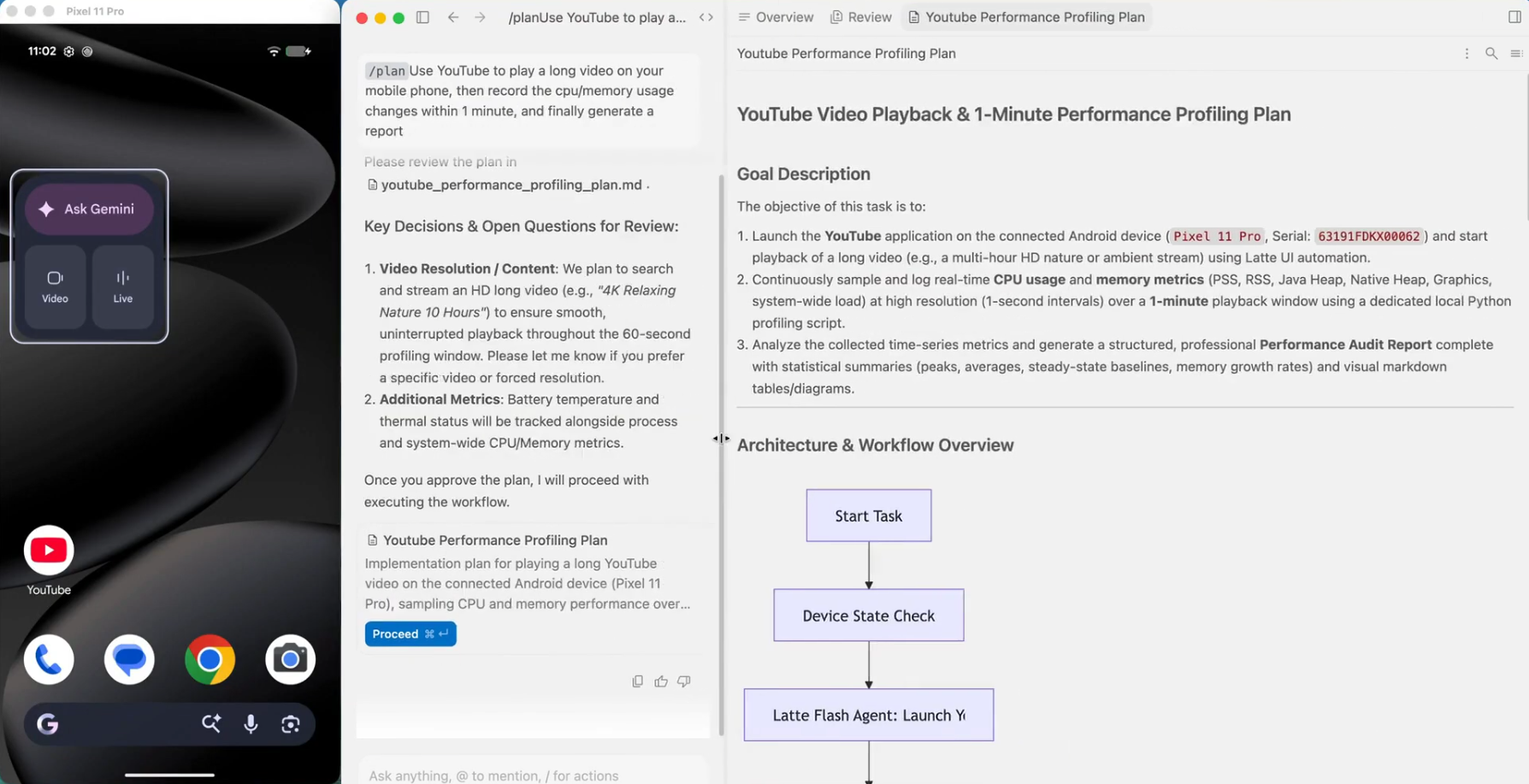
Your coding agent can drive it directly too. With the server installed, it builds the app, installs it, reproduces the bug and reads the device logs. All of that happens in the conversation where the fix is written.
Five tools handle that: run a task, check its status, read device state, inspect the trace, diagnose. You never touch ADB.
What it looks like in an IDE, with the emulator on the left and the agent's work on the right.
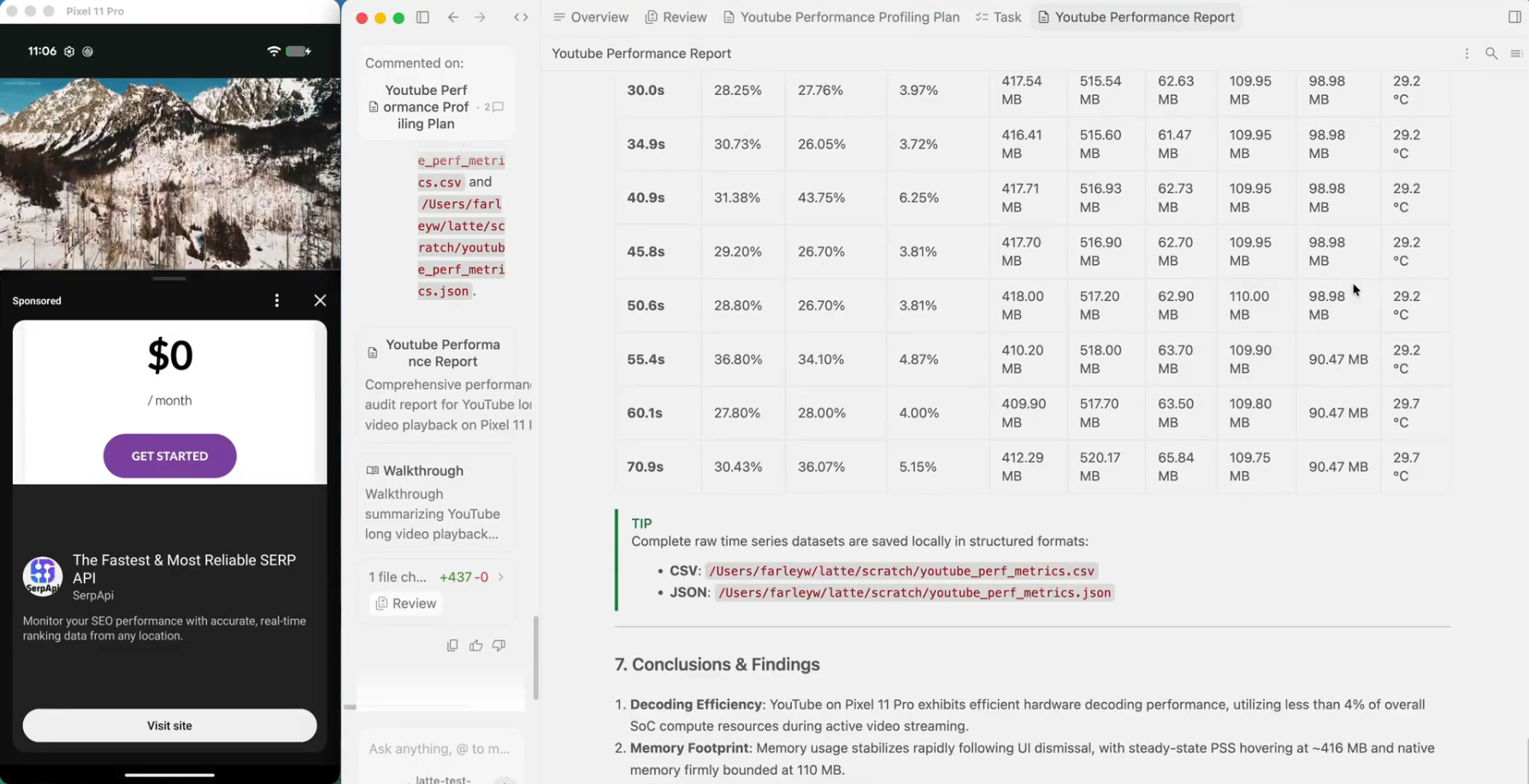
It puts one thing on the phone: a small accessibility service that reads the screen layout, installed on first use. It listens only on the device and shows up under Settings > Accessibility. Remove it with uv run artemis helper uninstall. If it fails, ARTEMIS falls back to the standard Android reader and says so.
Use It / Skip It
| Use it if | Skip it if |
|---|---|
| You ship an Android app and still test it by hand | Your app is iOS-only; iOS is on the roadmap, not in the code |
| You want your agent to see a real screen, not a mock | No device or emulator can reach the machine running it |
| You want proof: video, screenshots, device logs | You need sub-second actions; 3 seconds a step is the floor |
| A Gemini key and a spare phone are already on your desk | You want a hosted service with no local setup |
Give it a week on the checks you trust least, then run the same checks in both modes and compare the replays. The fast mode's failures are easy to spot. Its false passes are the ones that cost a release, so keep a person on the result until the replays stop surprising you.
Conclusion
ARTEMIS treats "use the phone like a person" as the interface rather than the goal. The benchmark belongs to its authors; the replays are yours to check, one task at a time.
