


⭐ 1.3k stars • Describe your stack in one sentence • Official brand logos
🚀 Quick Installation
Install the skill into the agent you already use — Claude Code, Codex, Cursor or any agent that reads the Agent Skills format.
npx (Recommended)
npx skills add caru-ini/stack-diagramClaude apps
# Download stack-diagram.zip from Releases, then upload it as a skill
open https://github.com/caru-ini/stack-diagram/releases/latest
Requirements
Python 3.9+ and network access for the logos. PNG export adds Playwright with Chromium:
pip install playwright
python3 -m playwright install --with-deps chromium
Overview
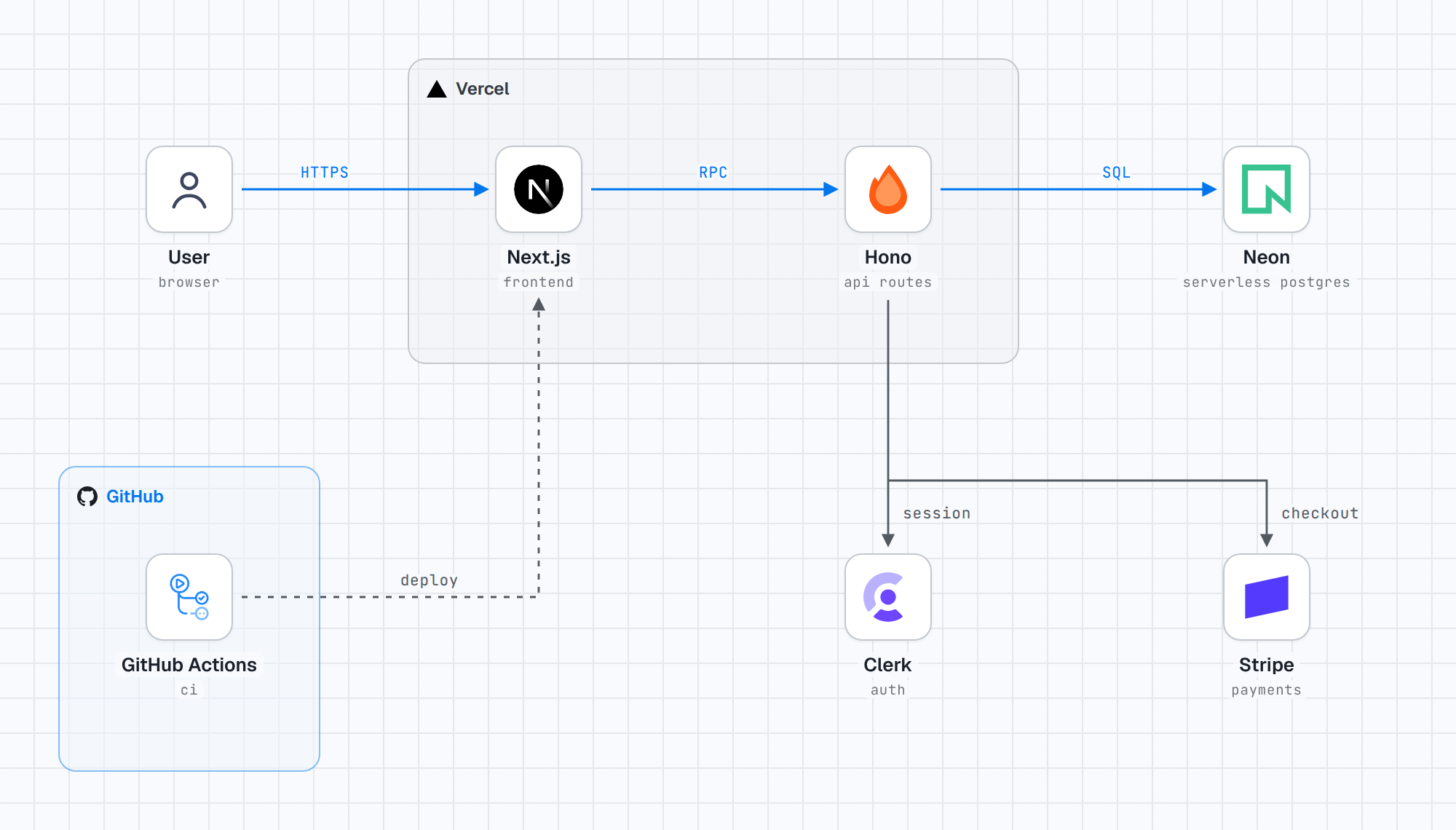
stack-diagram is an agent skill that turns a plain sentence about your stack into a cloud-architecture-style diagram: real brand logos on white tiles, labelled group boxes around things that share a runtime or vendor, and orthogonal arrows with monospace labels on a cool graph-paper background.
You describe the system. The agent works out the nodes, the groups and the flows, fetches the official logo for every service, plans the coordinates, builds the diagram, then renders it and looks at the result before handing it over.
💡 Key Differentiator: The logos are the real marks, pulled from the vendors' own sources and never recoloured — which is the difference between a diagram you can put in a client deck and one that quietly gets every brand wrong.
Why stack-diagram Stands Out
1. Official marks, not redrawn approximations
Icons come from svgl first, then devicon, then gilbarbara/logos, then the brand's own repository or site. AWS, Google Cloud and Azure diagrams use each vendor's own icon package — the same set their solution architects draw with. Monochrome icon sets are deliberately excluded, because a redrawn glyph is the thing people spot instantly and quietly stop trusting.
When a logo is white or too light for a white tile, the skill puts it on a dark tile instead of touching the fill. Abstract nodes — a cron job, a queue, a cache, a webhook receiver — get a line pictogram rather than text in a box.
2. The agent checks its own output
Most generated diagrams fail in the same place: an arrow drawn straight through a label. This skill ships geometry rules where a node is its tile plus the text underneath, so vertical arrows connect node-box boundaries and never cut through captions. Then it screenshots the render and reads the image, checking for collisions, white-on-white icons, clipped corners and group padding before it delivers anything.
3. Groups and edge types carry meaning
A diagram that reads like an engineering drawing needs more than boxes. The skill draws a group box around services sharing a runtime or vendor (nested one level — deeper gets noisy) and uses three edge styles to separate three kinds of relationship:
| Edge style | What it means | Typical example |
|---|---|---|
| Accent, solid | The primary request or data path | User → Next.js → Hono → Postgres |
| Neutral, solid | Secondary internal connections | API → auth provider, API → payments |
| Neutral, dashed | Dev-time and deploy-time relationships | GitHub Actions → deploy, git hooks, IaC |
4. One source file, four deliveries
The diagram exists as a single self-contained HTML file with fonts and logos inlined, so it renders anywhere with no network — drop it into a repo, a wiki page or a Claude artifact link. The PNGs and the React component are derived from that same file, which means the picture you approved is the picture that ships.
- HTML — the default, fully offline, one file
- PNG — light and dark versions, captured from the HTML at 2× scale
- React / TSX — a dependency-free component for design-system docs
- Artifact — a shareable link where the environment offers one
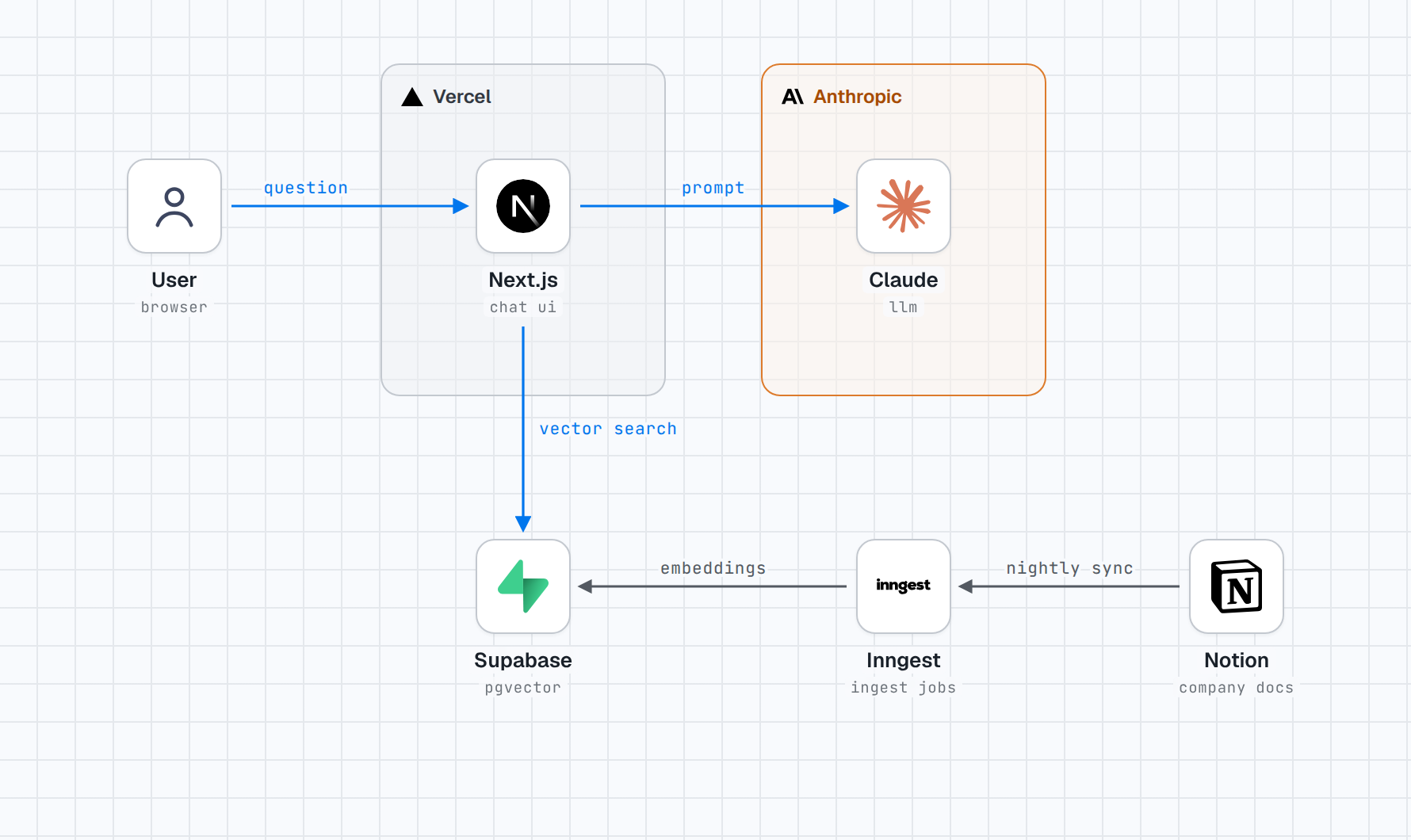
One prompt produced this: Next.js chatting to Claude inside the Anthropic group, Supabase pgvector for retrieval, and a dashed-free grey path from Notion through Inngest for the nightly ingest.
How It Works
The loop is short, and each step exists because skipping it breaks the picture:
- Content — derive nodes, groups and edges; infer sensible groups from a flat list of tools
- Icons — fetch official marks per service, flag any that will vanish on a white tile
- Geometry — plan coordinates against fixed spacing constants and anchoring rules
- Build — fill the HTML template; the build fails loudly on unresolved tokens instead of shipping gaps
- Verify — render a PNG, read it, fix collisions, repeat until clean
- Deliver — emit the format you asked for
Themes are handled throughout: every diagram renders in light and dark, tiles stay white so logos keep their own colour, and group labels switch to the brand's dark-theme mark where one exists.
When to Use It
- Handoff and onboarding docs — a system map a new engineer can read without a narration track
- Client and stakeholder decks — brand-accurate logos, no improvised recolouring
- Architecture decision records — a diagram that lives in the repo as one HTML file
- Design-system documentation — the React output drops straight into your docs site
- Cloud-specific layouts — AWS, GCP and Azure diagrams that follow each vendor's own drawing conventions, including public and private subnets
When Not to Use It
- You need a free-form sketch or a whiteboard doodle during a meeting — this produces a finished drawing, not a thinking tool
- Your diagram is a data-flow chart with no brand identity, where the icons add nothing
- You cannot install Python or give the agent network access for the logo fetch
Conclusion
The value here is not that an agent can draw boxes. It is that the drawing conventions — real logos, groups that mean something, arrows that route around text, a verification pass before delivery — are baked into the skill instead of left to the model's mood. Describe your stack in a sentence, and what comes back looks like it came out of a cloud vendor's architecture deck rather than a chat window.
Install it with npx skills add caru-ini/stack-diagram, then ask for the diagram of the system you are working on now. If you like the result, the skill offers once to add it to the public gallery at stacks.caru.moe — it shows what would be public and only posts after a second yes.
