


🎙️ Podcast - Audio Summary
📺 Video Summary
📑 Slides
📝 Deep Dive: Claude Code Best Practices for Faster AI Workflows
1. Introduction: Beyond the Chatbot
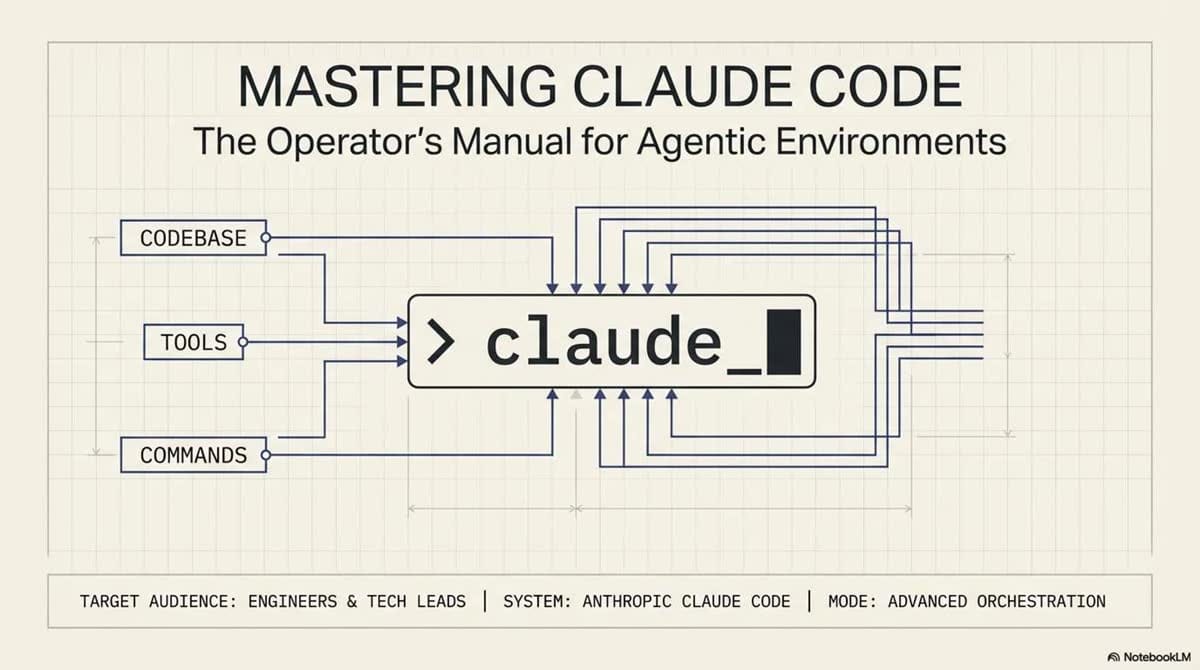
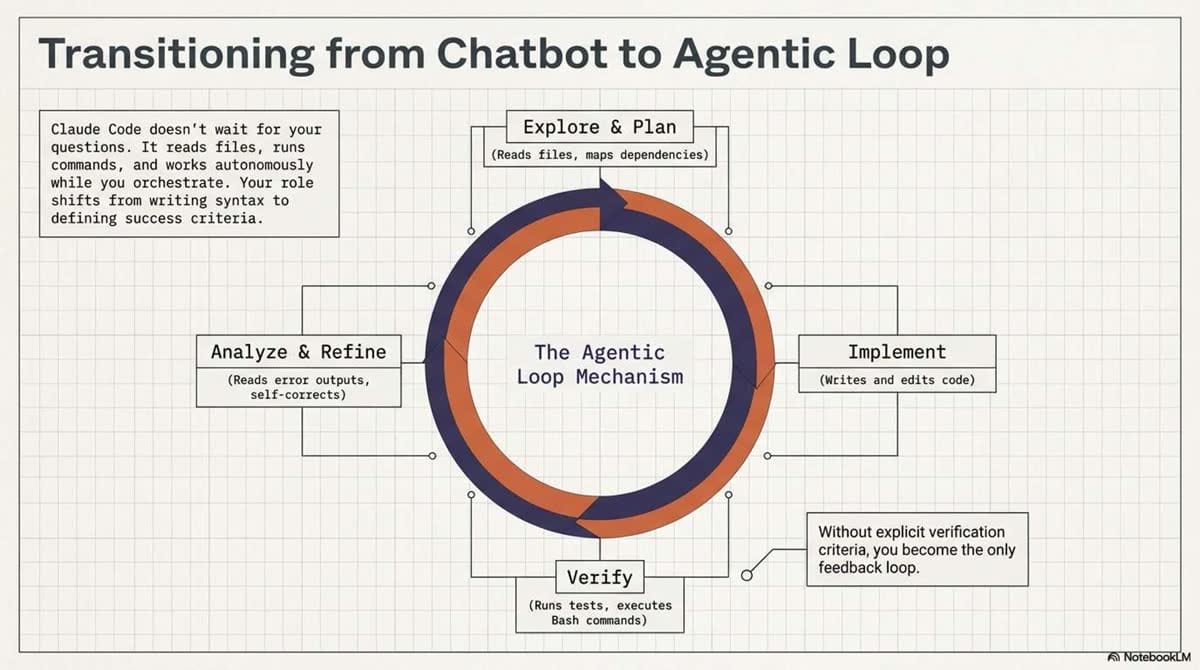
To master Claude Code, you must first transition from a "chatbot" mindset to an agentic environment mindset. A traditional chatbot answers questions and waits; Claude Code is an autonomous collaborator that reads your file system, executes terminal commands, and implements multi-file changes while you oversee the process.
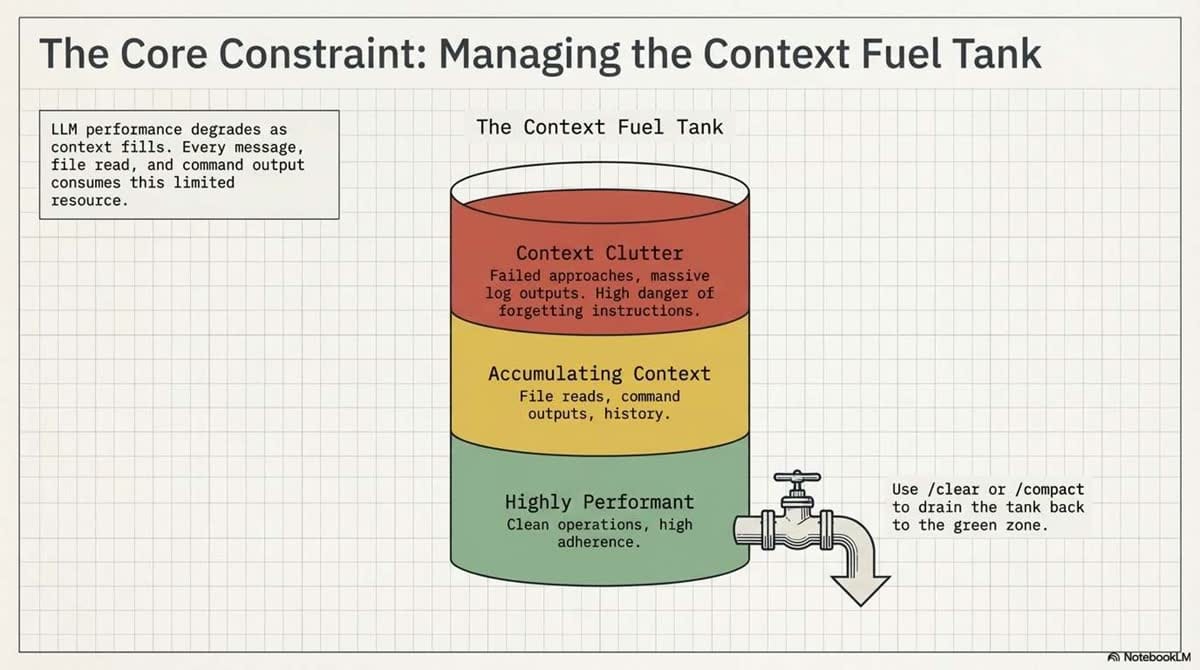
However, this autonomy is governed by a critical technical constraint: the Context Window. Your entire session—every file read, every command output, and every line of chat—consumes tokens. As the window fills, you will encounter performance degradation. Claude may begin "forgetting" instructions or losing the nuance required for complex logic. Managing this "context debt" is the single most important skill for a power user.
2. The Single Highest-Leverage Habit: Verification
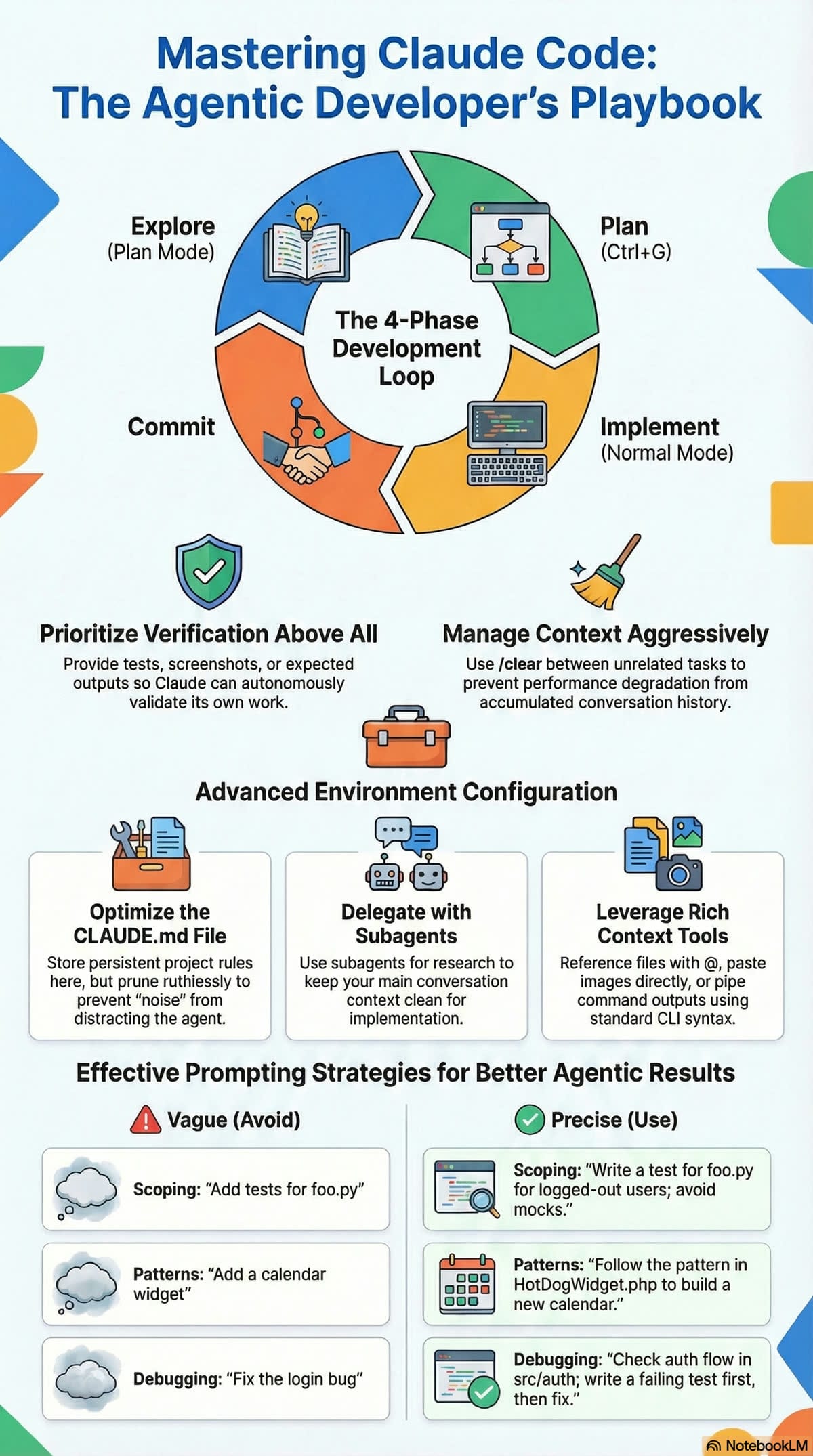
Claude performs exponentially better when it has a way to verify its own work. Without clear success criteria, you become the sole feedback loop, which leads to "trust-then-verify" gaps and broken deployments.
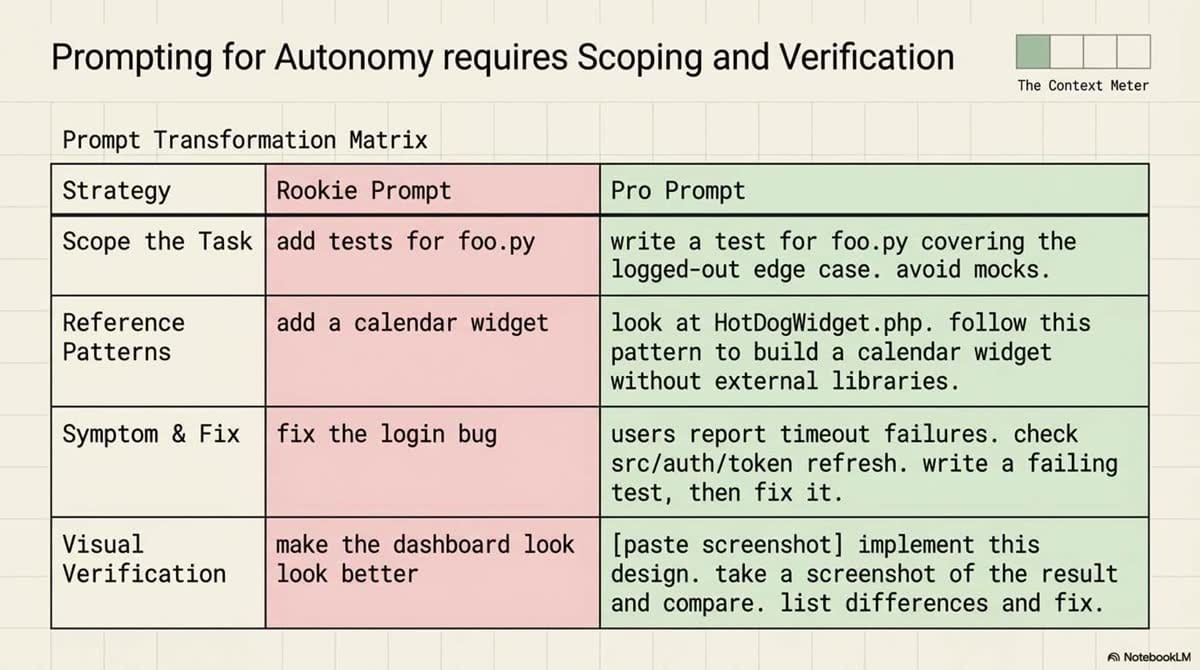
Verification Strategies: Before vs. After
| Strategy | Vague (Avoid) | Verifiable (Pro) |
|---|---|---|
| Criteria | "Implement a function that validates email addresses." | "Write a validateEmail function. Test cases: [email protected] is true, invalid is false. Run npm test -- --grep=validateEmail after implementing." |
| Visual UI | "Make the dashboard look better." | "[Paste screenshot] Implement this design. Use the Claude in Chrome extension to take a screenshot of the result and compare it. Fix any delta." |
| Root Cause | "The build is failing." | "The build fails with error: [paste error]. Fix it and verify with make build. Address the root cause, do not just suppress the error." |
3. The "Think Before You Code" Workflow
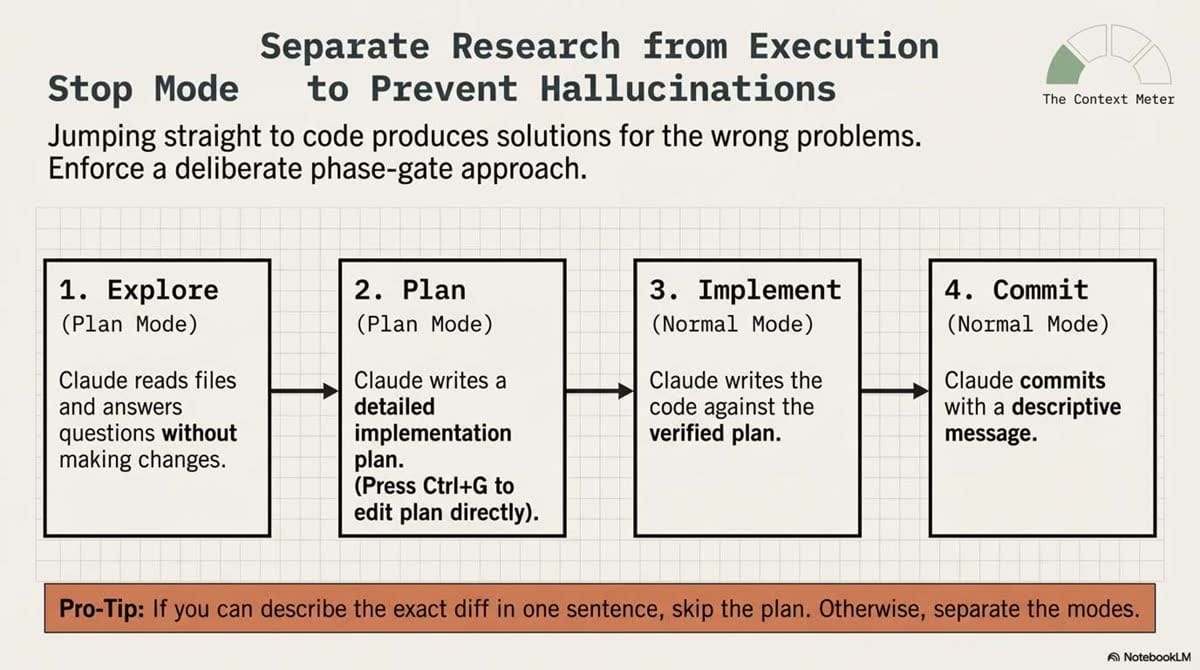
Jumping straight into implementation often leads to solving the wrong problem. For non-trivial tasks, follow this structured workflow:
The Interview Pattern (Optional)
For large features, start by asking Claude to "interview" you. Use the AskUserQuestion tool to let Claude probe for technical implementation details, edge cases, and architectural tradeoffs. Once the spec is solidified, start a fresh session for the implementation to keep context clean.
The Four-Phase Workflow
- Explore (Plan Mode): Claude reads files and answers questions without making changes. This is ideal for codebase onboarding.
- Plan (Plan Mode): Ask Claude for a detailed implementation plan.
- Engineer Note: Use Ctrl+G to open the plan in your local editor. Manually edit the plan to ensure it aligns with your architecture before Claude begins.
- Implement (Normal Mode): Switch modes and let Claude execute the plan, verifying each step.
- Commit (Normal Mode): Have Claude commit with a descriptive message or generate a PR using tools like the
ghCLI.
Pro-tip: Skip planning for "one-sentence diffs" (e.g., typos, renames, or log lines) to avoid unnecessary token overhead.
4. Optimizing Your Environment with CLAUDE.md
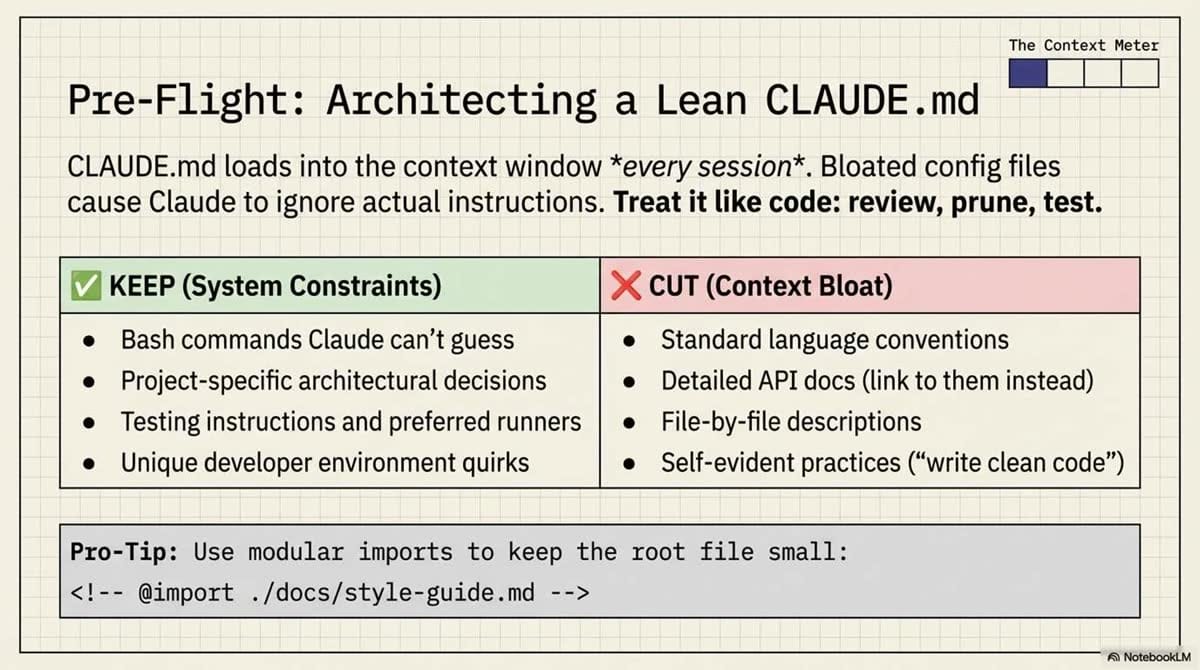
The CLAUDE.md file is your persistent "brain" for the project. Run /init to generate a foundation based on your project structure.
Technical Configuration:
- Imports: Use
@path/to/importsyntax to pull in external files, which is vital for managing monorepos without bloating the main config. - Locations: Claude looks in the project root, your home folder (
~/.claude/CLAUDE.md), and parent directories. It even pulls in child directoryCLAUDE.mdfiles on demand.
CLAUDE.md Content Guidelines
| ✅ Include | ❌ Exclude |
|---|---|
| Specific Bash commands for builds/tests | Standard language conventions (Claude knows these) |
| Project-specific style rules and naming | Frequently changing data |
| Repository etiquette (branch naming, etc.) | Long tutorials or API docs (use URLs instead) |
| Environment quirks (required env vars) | Self-evident advice ("write clean code") |
5. Precision Prompting and Rich Content
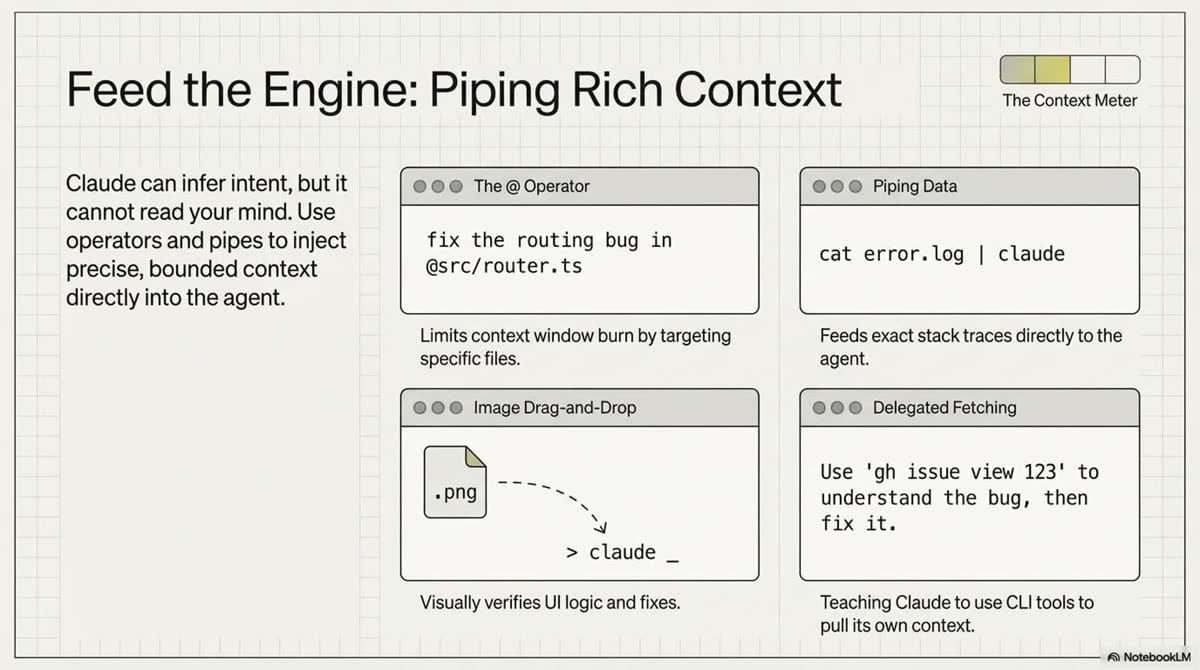
To minimize corrections, provide high-density context using the following methods:
- The
@Symbol: Directly reference files (e.g., "Review the logic in@src/auth/service.ts"). - Piping Data: Send logs directly to the agent:
cat error.log | claude. - Screenshots: Drag-and-drop UI mocks or current errors directly into the prompt.
- Documentation: Use
/permissionsto allowlist domains so Claude can fetch the latest API references autonomously.
6. Advanced Customization: Skills, Subagents, and Hooks
Extend Claude's capabilities beyond simple code editing:
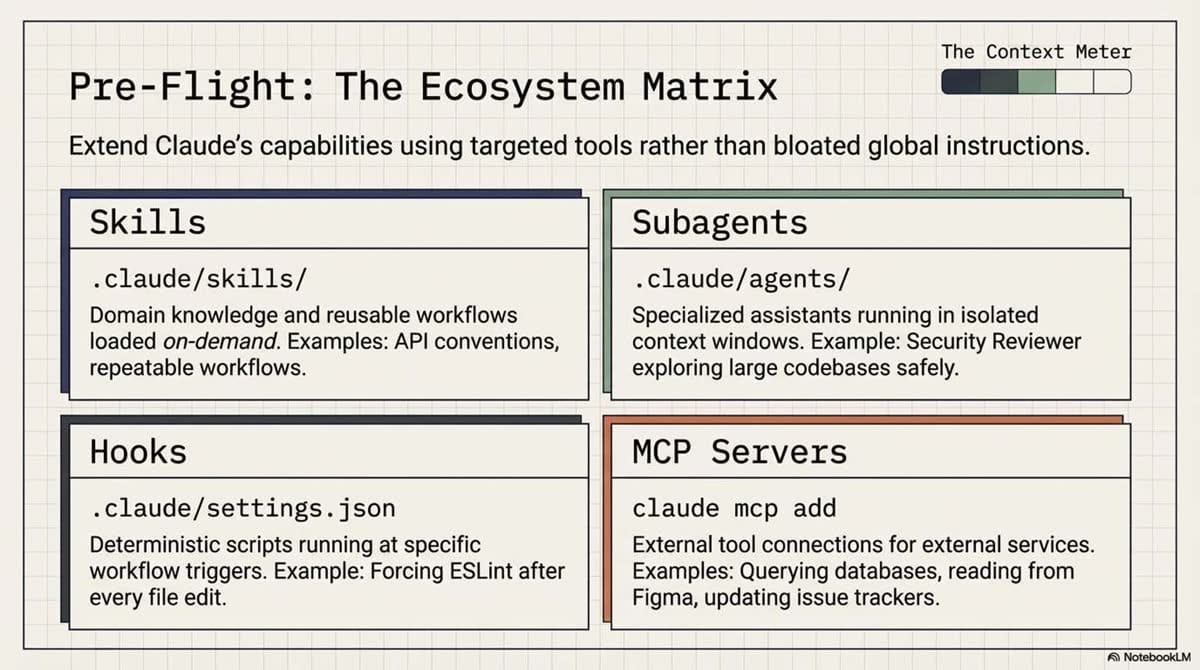
- Skills: Reusable workflows defined in
.claude/skills/. Usedisable-model-invocation: truefor sensitive workflows you want to trigger manually via/skill-name. - Subagents: Defined in
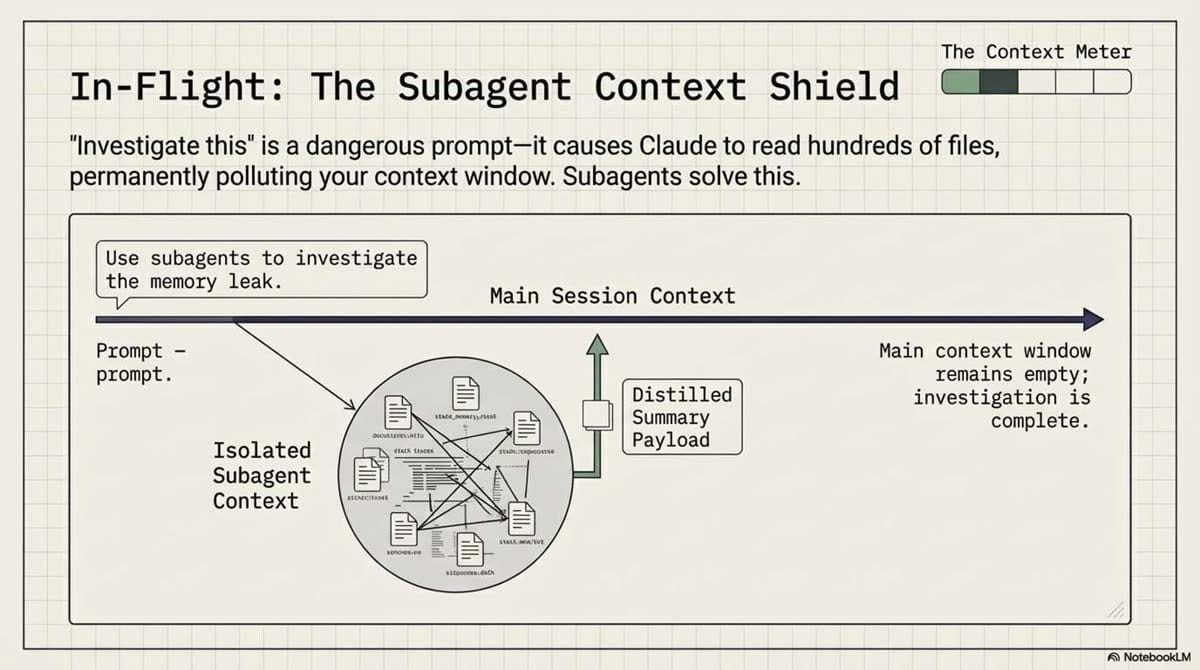
.claude/agents/. Their primary value is context isolation. Delegate research to a subagent so it can read hundreds of files without poisoning your main conversation's context window. - Hooks: Configured in
.claude/settings.json. These are deterministic scripts that must run (e.g., runningeslintafter every file edit). UnlikeCLAUDE.md, which is advisory, hooks are guaranteed. - MCP Servers: Use
claude mcp addto connect to external state like Figma, databases, or Notion.
7. Aggressive Context Management
When Claude begins to loop or hallucinate, it is usually due to "context poisoning." Use these maneuvers to reset the state:
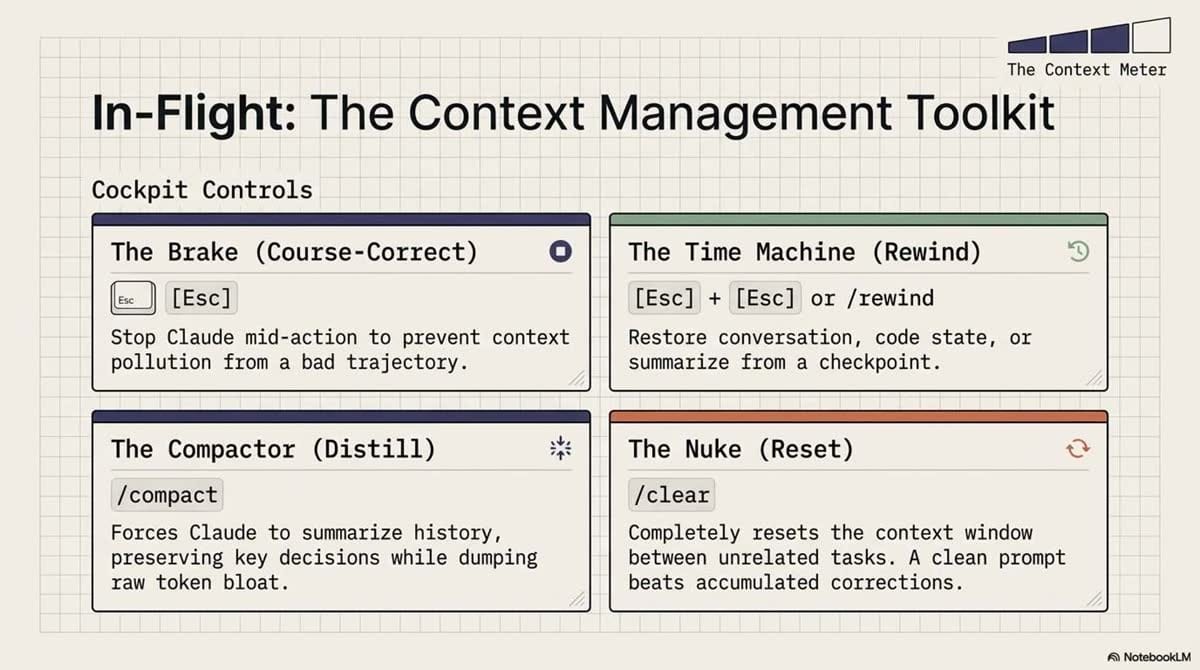
- Esc: Stop Claude mid-action if you see it heading down a rabbit hole.
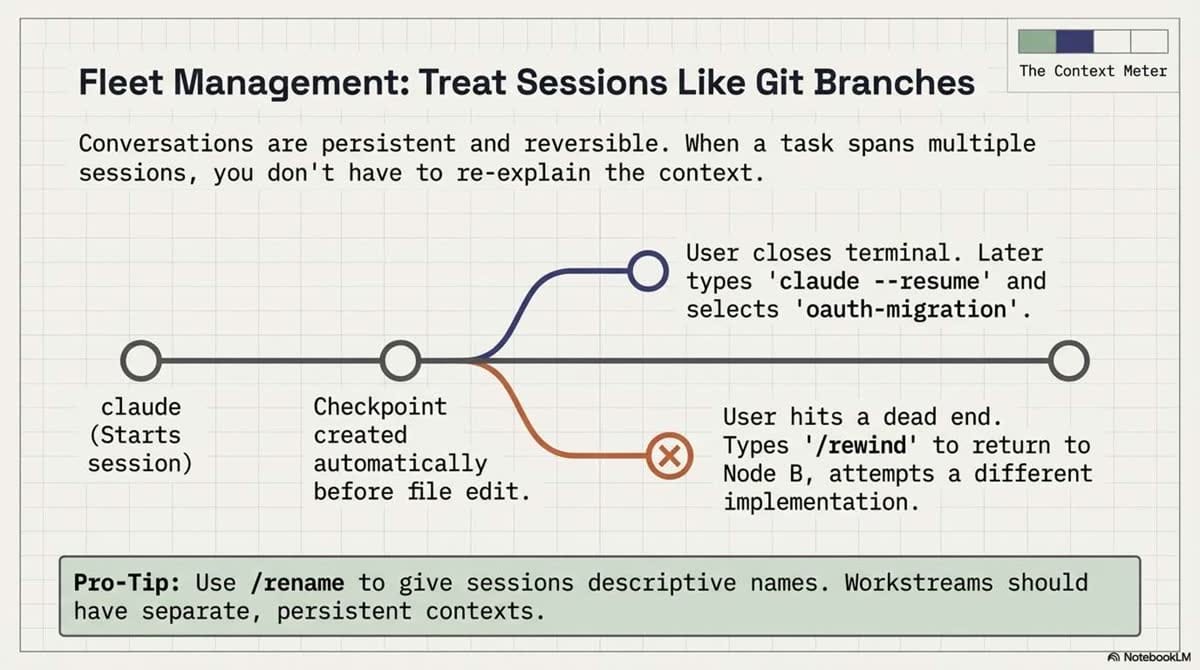
- Esc + Esc or /rewind: Opens a menu to restore the conversation and code state to a previous checkpoint.
- Pro-tip: Checkpoints persist even after you close the terminal.
- /clear: The "nuclear option." Use this between unrelated tasks to ensure the agent has zero "memory" of previous, irrelevant problems.
- /btw: Use for "context-free" questions (e.g., "What does this regex do?") that shouldn't enter the permanent session history.
- /compact: Manually trigger history summarization to focus on specific architectural details while shedding token weight.
8. Scaling and Automation
Claude Code is designed for horizontal scale. Use these advanced CLI flags for batch operations and session management:
- Session State: Use
--continueto pick up the last session or--resumeto choose from a list. Use/renameto treat sessions like Git branches (e.g.,/rename feature-oauth). - Automation: Use
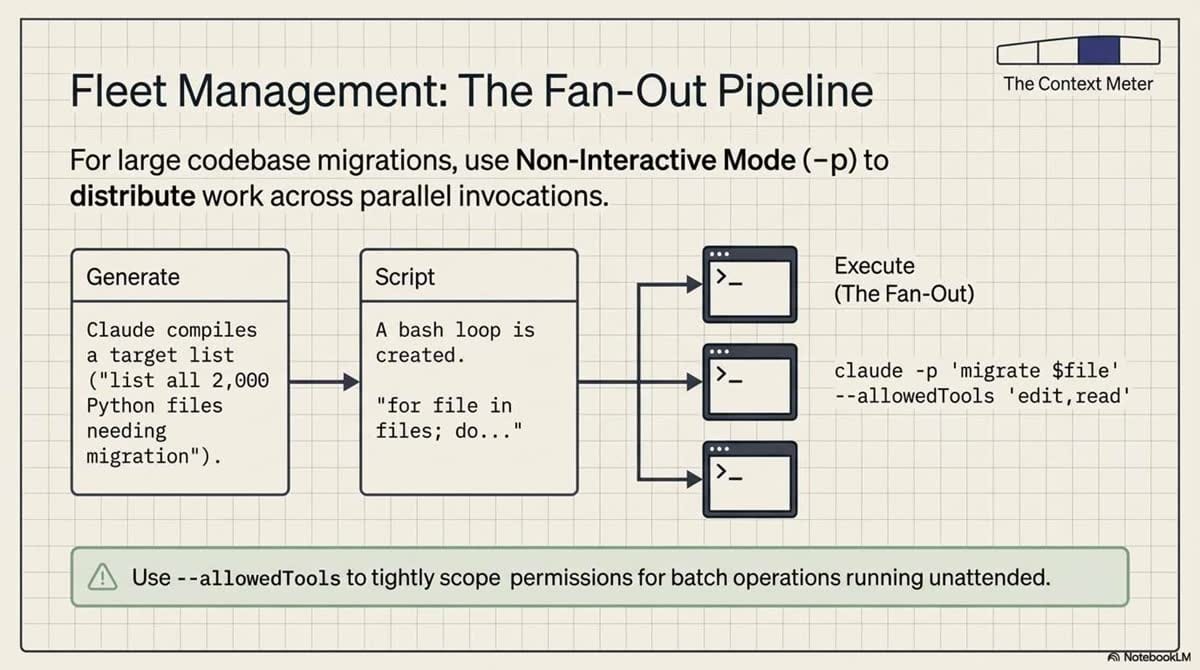
claude -p "prompt"for non-interactive runs. --allowedTools: Scope permissions for unattended batch jobs.--output-format stream-json: Essential for programmatic parsing of Claude's output.- Auto Mode: Uses a classifier model to check command safety, reducing permission interruptions during routine tasks.
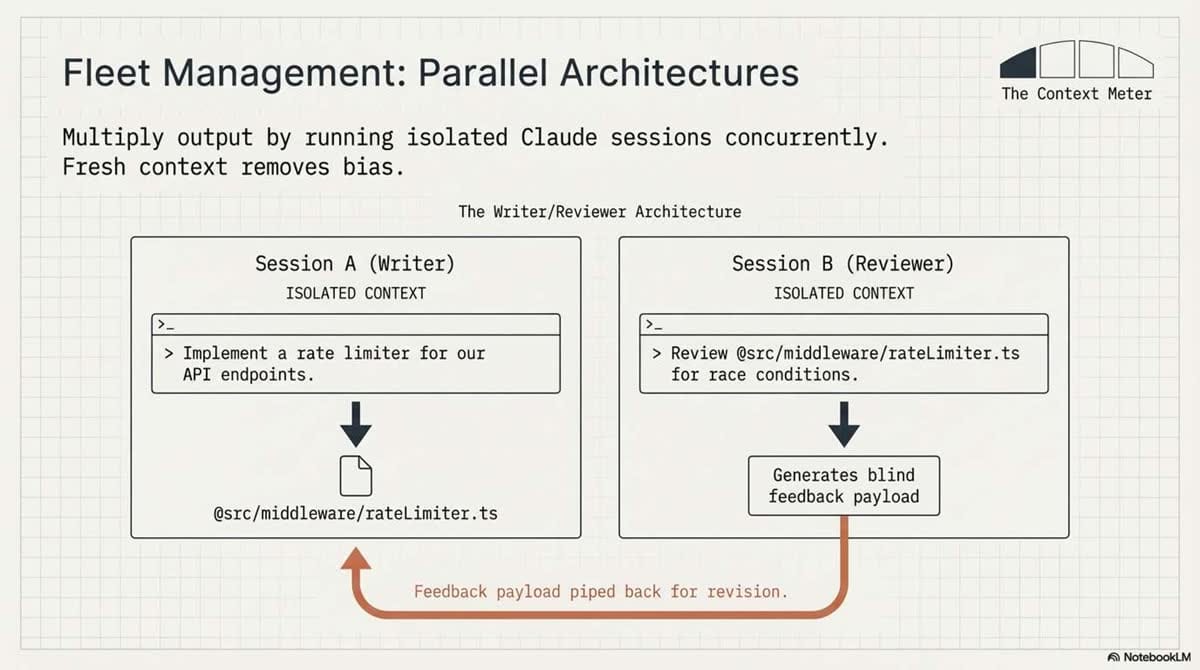
- Writer/Reviewer Pattern: Run two parallel sessions. Use Session A to implement, then use Session B (fresh context) to review. This prevents writer's bias, where the agent overlooks its own logic flaws.
9. Avoiding the "Failure Patterns"
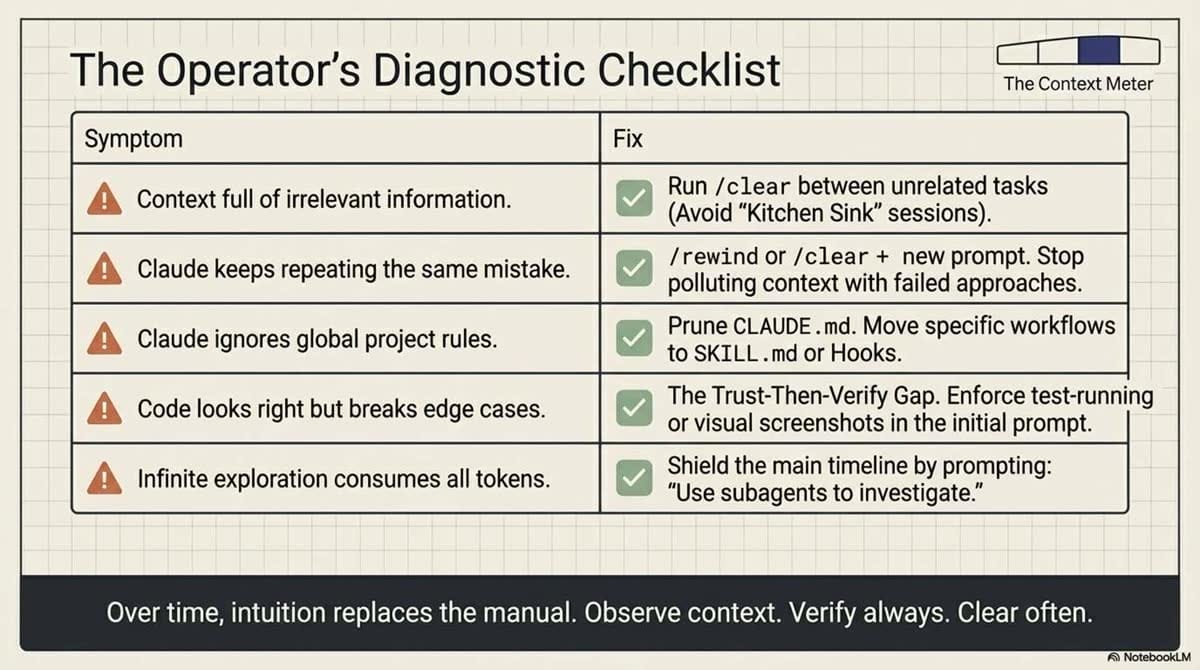
Even experts fall into these traps. Recognize them to save hours of debugging:
- The Kitchen Sink Session: Mixing unrelated bug fixes in one window. Fix: Use
/clear. - Correcting Over and Over: If you've corrected Claude twice and it still fails, the context is poisoned. Fix:
/clearand start with a more precise prompt based on what you learned. - The Over-specified CLAUDE.md: Bloating the config until Claude ignores the actual prompt. Fix: Prune anything Claude can figure out by reading the code.
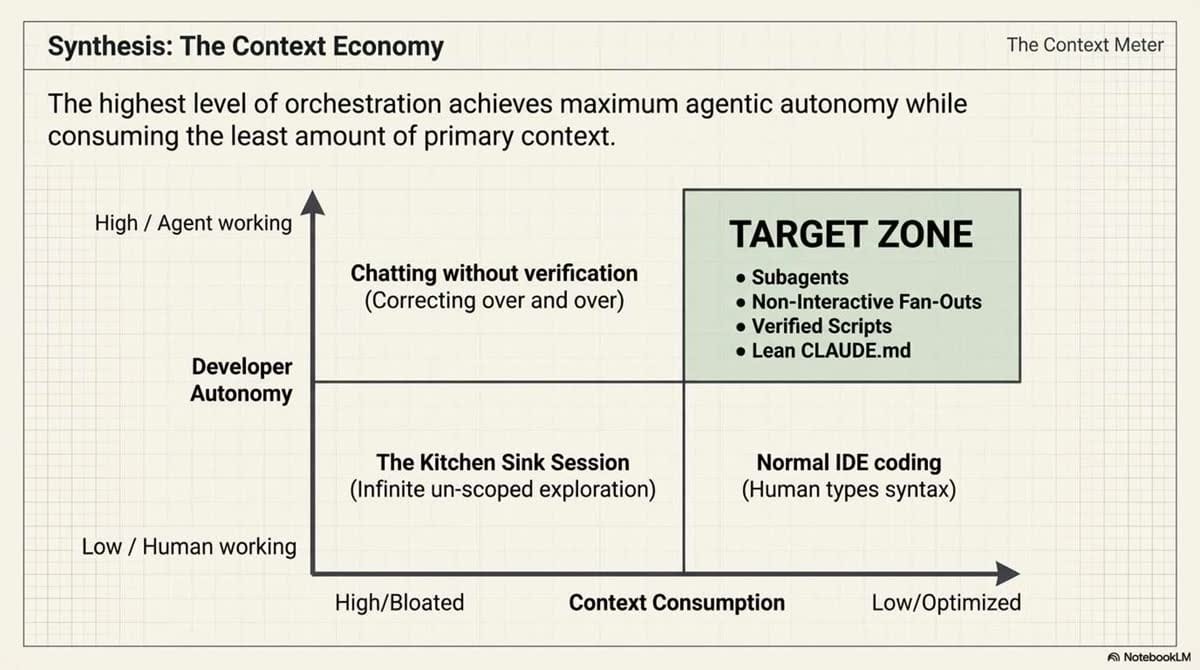
- Infinite Exploration: Allowing the agent to read 500 files to "understand" the project. Fix: Use subagents for research to maintain context isolation.
10. Conclusion: Developing Your Intuition
These practices are the foundation for high-velocity agentic development. The goal is to develop an intuition for when to be specific and when to let the agent explore. Observe your successful sessions: what was the prompt structure? How clean was the context?
Key Takeaways:
- Manage Context Aggressively: Use
/clear,/rewind, and subagents to combat performance degradation. - Provide Verification: Never accept an implementation that can't be proven with a test or screenshot.
- Plan Before Implementing: Use Plan Mode and the "Interview Pattern" for complex, multi-file changes.
- Leverage CLI Power: Master
/rename,--continue, andclaude -pto treat AI sessions with the same rigor as your Git workflow.
📄 Briefing Doc: Technical Analysis
📋 Technical Specifications & Detailed Analysis
Best Practices for Claude Code: Comprehensive Briefing
Claude Code is an agentic coding environment that shifts the developer's role from writing every line of code to describing objectives for an autonomous system. Unlike traditional chatbots, Claude Code can read files, execute commands, and implement changes independently. This document synthesizes the core themes, configuration strategies, and operational best practices required to maximize the effectiveness of this agentic environment.
Executive Summary
The transition to Claude Code requires a fundamental shift in mental models. The primary constraint of the system is the context window, which stores conversation history, file contents, and command outputs. Because Large Language Model (LLM) performance degrades as the context window fills, successful usage depends on aggressive context management.
The "highest-leverage" practice for any user is providing the agent with a means to verify its own work through tests, screenshots, or expected outputs. By adopting a structured workflow—exploring and planning before implementing—and utilizing persistent configuration files like CLAUDE.md, developers can automate complex tasks and scale their output across parallel sessions.
Core Themes and Strategic Workflows
1. The Primacy of Verification
Claude performs significantly better when it has clear success criteria to check against. Without verification tools, the user becomes the only feedback loop, which increases the likelihood of shipping code that looks correct but fails in practice.
- Strategy: Provide test cases, UI screenshots, or specific linter commands in the prompt.
- Visual Verification: For UI changes, the "Claude in Chrome" extension allows the agent to open tabs, test the interface, and iterate until the design matches the requirement.
2. The Four-Phase Workflow
To avoid solving the wrong problem, the documentation recommends a structured approach to complex tasks:
| Phase | Mode | Action |
|---|---|---|
| 1. Explore | Plan Mode | Claude reads files and answers questions without making changes. |
| 2. Plan | Plan Mode | Claude generates a detailed implementation plan (editable via Ctrl+G). |
| 3. Implement | Normal Mode | Claude executes the plan and verifies against success criteria. |
| 4. Commit | Normal Mode | Claude creates a descriptive commit message and opens a PR. |
Note: For small fixes (typos, single log lines), these phases can be skipped in favor of direct execution.
3. Precision Prompting
Effective communication involves providing specific context and pointing Claude to existing patterns rather than providing vague instructions.
- Scope the Task: Specify exactly which files and scenarios to cover (e.g., "write a test for foo.py covering logged-out users; avoid mocks").
- Reference Patterns: Direct Claude to existing examples (e.g., "Follow the pattern in HotDogWidget.php for this new calendar widget").
- Rich Content: Utilize the
@symbol to reference files directly, paste screenshots for UI tasks, and pipe data (e.g.,cat error.log | claude) for debugging.
Environment Configuration and Extension
Persistent Context: CLAUDE.md
CLAUDE.md is a critical file read at the start of every session. It provides persistent context that cannot be easily inferred from the code alone.
| ✅ Include in CLAUDE.md | ❌ Exclude from CLAUDE.md |
|---|---|
| Non-obvious Bash commands | Standard language conventions |
| Project-specific code style rules | Detailed API documentation (use links) |
| Preferred test runners | Information that changes frequently |
| Architectural decisions | File-by-file descriptions |
| Dev environment quirks (env vars) | "Self-evident" practices (e.g., "write clean code") |
Advanced Extension Tools
- Permissions: Use Auto Mode (where a classifier model reviews commands for risk) or Allowlists to reduce manual approval interruptions.
- Hooks: Deterministic scripts that run at specific points (e.g., running
eslintafter every edit). - Skills: Reusable workflows or domain knowledge stored in
.claude/skills/. - Subagents: Specialized assistants defined in
.claude/agents/that can perform isolated tasks (like security reviews) in a separate context window to avoid cluttering the main conversation. - MCP Servers: Connect Claude to external tools like Notion, Figma, or databases using
claude mcp add.
Managing the Context Window
The context window is described as the "most important resource to manage." Users must proactively keep it lean to maintain high performance.
- Course-Correction: Stop Claude immediately (Esc) if it deviates. Use
/rewindor "Undo that" to revert mistakes. - Compaction: Claude automatically compacts history when limits are reached, but users can manually trigger
/compact <instructions>to summarize specific details. - Aggressive Clearing: Use
/clearbetween unrelated tasks. A fresh session with a refined prompt is more effective than a long session filled with failed attempts. - Subagents for Research: When Claude needs to read many files to understand a codebase, delegating this to a subagent prevents the main context window from filling up with research data.
Automation and Scaling
Claude Code can be parallelized and integrated into automated systems for high-volume tasks.
- Non-Interactive Mode: Use
claude -p "prompt"for CI/CD pipelines or pre-commit hooks. - Parallel Sessions: Run multiple sessions via the desktop app or web interface to speed up development. This allows for a Writer/Reviewer pattern, where one Claude instance implements code and a fresh instance (with no bias) reviews it.
- Fan-Out Patterns: For large-scale migrations (e.g., updating 2,000 files), use a script to loop through a task list and call
claude -pfor each file, using--allowedToolsto restrict the agent's scope.
Important Quotes and Context
- On Verification: "Include tests, screenshots, or expected outputs so Claude can check itself. This is the single highest-leverage thing you can do."
- Context: Emphasizing that Claude’s autonomy is only as good as the feedback loop it operates within.
- On Context Management: "The context window is the most important resource to manage... LLM performance degrades as context fills."
- Context: Explaining the technical reality that the more Claude "remembers" from a long session, the more likely it is to make mistakes.
- On Planning: "If you could describe the diff in one sentence, skip the plan."
- Context: Providing a rule of thumb for when to use the heavy four-phase workflow versus simple direct commands.
- On CLAUDE.md Bloat: "Bloated CLAUDE.md files cause Claude to ignore your actual instructions! For each line, ask: 'Would removing this cause Claude to make mistakes?' If not, cut it."
- Context: Warning against the tendency to overload persistent instructions, which can lead to "instruction noise."
Actionable Insights
- Initialize Immediately: Run
/initin every new project to generate a baselineCLAUDE.mdand refine it as the project evolves. - Adopt a "Clear and Refine" Habit: If Claude fails twice on the same issue, do not keep correcting it. Run
/clearand start a new session with a prompt that includes the lessons learned from the failures. - Use Subagents for Heavy Lifting: For any task requiring the reading of more than 5–10 files for "investigation," explicitly instruct Claude to "use a subagent to investigate" to preserve the main session's token budget.
- Leverage CLI Tools: Install tools like
gh(GitHub CLI) oraws-cli. Claude is highly efficient at using these to interact with external services without needing manual web browser interaction. - Verify Visuals: When working on front-end tasks, always ask Claude to take a screenshot of its work and compare it to the design requirements.
